그 시간 사무실에 몇 명이 있었나?
출처: http://www.careercup.com/question?id=13817668
아마존 면접문제
A사무실에는 특정일자의 출퇴근 시간이 기록된 거대한 로그파일이 있다고 한다.
파일의 형식은 다음과 같다. (한 라인에서 앞부분은 출근시간(HH:MM:SS), 뒷부분은 퇴근시간이다)
09:12:23 11:14:35
10:34:01 13:23:40
10:34:31 11:20:10
특정시간을 입력(예:11:05:20)으로 주었을 때 그 시간에 총 몇 명이 사무실에 있었는지 알려주는 함수를 작성하시오.
142개의 풀이가 있습니다.
이건 출근한 직원의 수, 그리고 저 '특정 시간'이 몇 개나 되느냐에 따라서 선택할 수 있는 전략이 크게 달라지는 문제인 것 같아요. 일단 질문의 수가 매우 많을 수 있다고 생각하고 구현했습니다
'특정 시간 t'에 사무실에 있는 사람들을 구하려면 (t보다 이전에 출근한 직원의 수) - (t보다 이전에 퇴근한 직원의 수) 가 됩니다.
질문의 수가 굉장히 많을 수 있다면 하나하나 카운팅하는 방법은 너무 오래 걸릴 수 있습니다. 그래서 직원들의 출근 시간을 정렬하고, 또 퇴근 시간을 정렬합니다. 그렇게 하고 나서 이진 탐색(binary search)를 통해 답을 찾았습니다.
class TimeSheet
    def initialize
        @enters =[]
        @leaves = []
        @sorted = true
    end

    def parse_time(timeStr)
        h, m, s = timeStr.split(":").map(&:to_i)
        h * 3600 + m * 60    + s
    end

    def register(enter_time, leave_time)
        @enters << parse_time(enter_time)
        @leaves << parse_time(leave_time)
        @sorted = false
    end

    def upper_bound(array, value)
        begin_index = 0
        end_index = array.length

        while begin_index < end_index
            mid_index = (begin_index + end_index) >> 1

            if array[mid_index] <= value
                begin_index = mid_index + 1
            else
                end_index = mid_index
            end
        end
        begin_index
    end

    def how_many?(query_time)
        unless @sorted
            @enters.sort!
            @leaves.sort!
            @sorted = true
        end

        if query_time.class == String
            query_time = parse_time(query_time)
        end

        #for sorted array, it is better to use binary search
        #if the number of query is small, you can use Array.count methods instead.
        upper_bound(@enters, query_time) - upper_bound(@leaves, query_time)
    end
end


ts = TimeSheet.new
File.open("attandance.log") do |f|
    f.each_line do |line|
        enter_time, leave_time = line.split(/\s+/)
        ts.register(enter_time, leave_time)
    end
end

querys = ["11:05:20", "10:35:00", "11:20:10"]
querys.each do |q|
    puts ts.how_many?(q)
end
초단위라면, 어차피 24시간*60분*60초 = 24*3600 = 86400 이어서 배열로 만들면 됩니다.
배열을 2개 만듭니다.
1번 배열에는 +1, -1을 입력하고(출퇴근 기록) 2번 배열에는 누적된 합을 기록해 둡니다(해당 시간의 결과값)
로그를 읽을 때는 O(n), 값을 출력할 때는 2번 배열(결과값)에서 바로 출력하면 되므로 O(1)이 됩니다. 아래는 간단히 코드를 첨부합니다. (알고리즘 부분은 load()함수만 보시면 됩니다)
# -*- coding: utf-8 -*-

def time2sec(t):
    h, m, s = map(int, t.split(":"))
    return h*60*60+m*60+s

timesheet = [0]*24*60*60
manysheet = [0]*24*60*60

def load(inputs):
    for input in inputs:
        s, e = input.split(' ')
        s = time2sec(s)
        e = time2sec(e)
        timesheet[s] += 1
        timesheet[e] -= 1

    manysheet[0] = timesheet[0]
    for i in range(1, 24*60*60):
        manysheet[i] = manysheet[i-1] + timesheet[i]

def howmany(time):
    sec = time2sec(time)
    print time, manysheet[sec]

input = [
'09:12:23 11:14:35',
'10:34:01 13:23:40',
'10:34:31 11:20:10'
]

if __name__ == "__main__":
    load(input)
    howmany('14:34:55')
public class CountMember {
    String[] times={"09:12:23 11:14:35","10:34:01 13:23:40","10:34:31 11:20:10"};
    int cntMem=0;

    public int count(String time){
        cntMem=0;
        for(String t : times){
            int s=replaceTime(t.split(" ")[0]);
            int e=replaceTime(t.split(" ")[1]);
            int ti=replaceTime(time);
            if(s<=ti && e>=ti){
                cntMem++;
            }
        }
        return cntMem;

    }

    public int replaceTime(String time){
        return Integer.parseInt(time.replaceAll(":",""));
    }

    public static void main(String args[]){
        System.out.println("count Member is ..."+new CountMember().count("11:05:20"));
    }

}
java로 풀었습니다. 초단위로 변환하지 않고 : 만 빼서 숫자로 변환한다음에 비교했습니다. 어차피 초로환산해서 계산하는거나 마찬가지인거 같네요
'''
092312 와 같이 숫자로 만들어서 비교해도 되고, 그냥 원래 string 그대로 비교해도 됨.
'''
t = ''.join( input().split(':') )
count = 0

with open('test.txt', 'r') as f:
    while 1:
        line = f.readline()
        if not line: break
        l = [ ''.join( x.split(':') ) for x in line.split() ]
        if l[0] <= t <= l[1]: count += 1

print(count)
파이썬입니다.
# -*- coding: utf-8 -*-
import unittest

def sec(src):
    h, m, s = map(int, src.split(":"))
    return h*60*60+m*60+s


class Office:
    def __init__(self):
        self.emp = []

    def add(self, e):
        self.emp.append(e)

    def count(self, t):
        t = sec(t)
        result = 0
        for e in self.emp:
            if e.s <= t <= e.e:
                result += 1
        return result


class Employee:
    def __init__(self, s, e):
        self.s = sec(s)
        self.e = sec(e)


def compute(src, t):
    office = Office()
    src = src.strip()
    for line in src.split("\n"):
        s, e = line.split(" ")
        office.add(Employee(s, e))
    return office.count(t)


class Test(unittest.TestCase):
    def test1(self):
        office = Office()
        e1 = Employee("09:12:23", "11:14:35")
        office.add(e1)
        self.assertEquals(1, office.count("11:05:20"))

    def test2(self):
        src = """
09:12:23 11:14:35
10:34:01 13:23:40
10:34:31 11:20:10
"""
        self.assertEquals(3, compute(src, "11:05:20"))


if __name__ == "__main__":
    unittest.main()
아마도 많은 분들이 이런방식으로 푸실것 같은데요..
아이디어는 다음과 같습니다.
- 출근시간과 퇴근시간을 초단위로 변경한 후에 그 값을 가지고 있는 객체를 생성하여 리스트에 담아 놓습니다.
- 그리고 입력으로 받는 시간을 포함하는 객체의 갯수를 카운트하여 리턴합니다.
파이썬은 다음과 같은 표현식이 가능합니다. 제가 파이썬을 좋아하는 이유중 하나죠 ^^
if 1 < a < 3:
coding by python beginner
log = '''09:12:23 11:14:35
10:34:01 13:23:40
10:34:31 11:20:10'''

baseTime = '11:05:20'
remainCnt = 0;

logs = log.split('\n')
for log in logs:
    log = log.split(' ')
    if log[0] <= baseTime <= log[1]:
        remainCnt += 1

print(remainCnt)
(def ^:dynamic *log-path* "./log")
(defn count-in-time [t]
  (let [seconds (fn [[h m s]] (+ (* 3600 h) (* 60 m) s))
        parse   (fn [s] (->> (re-find #"(\d\d):(\d\d):(\d\d)" s)
                             rest
                             (map #(Integer/parseInt %))
                             seconds))
        stayed? (fn [[i o]] (and (<= i (parse t))
                                 (<= (parse t) o)))
        lines   (-> *log-path* clojure.java.io/file clojure.java.io/reader line-seq)
        in-out  (->> (map #(clojure.string/split % #" ") lines)
                     (map #(map parse %)))
        stayed  (filter stayed? in-out)]
    (count stayed)))
Clojure 코드입니다.
테스트
=> (count-in-time "09:12:22")
0
=> (count-in-time "09:12:23")
1
=> (count-in-time "10:34:00")
1
=> (count-in-time "10:34:20")
2
=> (count-in-time "10:34:30")
2
=> (count-in-time "10:34:31")
3
=> (count-in-time "11:14:31")
3
=> (count-in-time "11:15:31")
2
=> (count-in-time "14:14:31")
0
Ruby
require 'time'

def count_people(times, time_criteria)
  time_criteria = Time.parse(time_criteria)

  times.split
    .map{|time| Time.parse(time)}
    .each_slice(2)
    .map{|time_pair| time_pair.inject{|i, o| time_criteria > i && time_criteria < o}}
    .count(true)
end
Test
require 'test/unit'
extend Test::Unit::Assertions

times = "09:12:23 11:14:35\n10:34:01 13:23:40\n10:34:31 11:20:10"

assert_equal count_people(times, "09:13:20"), 1
assert_equal count_people(times, "11:05:20"), 3
정말 많은 분들이 푸실만한 방법입니다. 간단히 sec 단위로 변경해서 그 범위내에서 있는지를 확인하는 식으로 처리했습니다. java 입니다.
public class OfficeCounter {

    private class InOutLogger {
        private final int inValue;
        private final int outValue;
        public InOutLogger(String logValue) {
            String[] logNumberStrings = splitLogMessage(logValue);
            if(logNumberStrings.length != 6) {
                throw new IllegalArgumentException();
            }
            inValue = convertStringsToSec(logNumberStrings, 0);
            outValue = convertStringsToSec(logNumberStrings, 3);
        }

        public boolean isExist(int sec) {
            return sec >= inValue && sec < outValue;
        }
    }

    public static String[] splitLogMessage(String logValue) {
        return logValue.split("[:\\s]");
    }

    public static int convertStringsToSec(String[] numbers, int startIndex) {
        return 60 * 60 * Integer.parseInt(numbers[startIndex]) +
                60 * Integer.parseInt(numbers[1 + startIndex]) +
                Integer.parseInt(numbers[2 + startIndex]);
    }

    private List<InOutLogger> inOutLoggers = new ArrayList<>();

    public void add(String logValue) {
        inOutLoggers.add(new InOutLogger(logValue));
    }

    public int count(String timeString) {
        int sec = convertStringsToSec(splitLogMessage(timeString), 0);
        int count = 0;
        for(InOutLogger inOutLogger : inOutLoggers) {
            if(inOutLogger.isExist(sec)) {
                count++;
            }
        }
        return count;
    }
}

public class OfficeCounterTest {
    private OfficeCounter officeCounter;
    @Before
    public void setUp() {
        officeCounter = new OfficeCounter();
        officeCounter.add("09:12:23 11:14:35");
        officeCounter.add("10:34:01 13:23:40");
        officeCounter.add("10:34:31 11:20:10");
    }

    @Test
    public void countTest01() {
        assertThat(officeCounter.count("11:05:20"), is(3));
    }
}
자바로 작성해봤습니다.
5년 만에 처음 코딩을 손에 잡은 DBA입니다. 많이 부족하지만 용기내서 올려봅니다.
import java.io.File;
import java.util.Scanner;

public class NumberOfManInOffice {
    public static void main(String args[]) {
        File file = null;
        String line = null;
        Scanner scanner = null;
        String [] splitString = null;
        String [] tempString = null;

        int count=0;
        int iArrival=0, iDeparture=0, iInput = 0;
        String sArrival = "";
        String sDeparture = "";
        String sInput = "";

        // 1. Read each line from test.txt
        file = new File("C:\\test.txt");

        // 2. Separate arrival and departure
        try {
            scanner = new Scanner(file);

            while (scanner.hasNextLine()) {
                sInput="";
                sArrival="";
                sDeparture="";

                splitString = scanner.nextLine().split(" ");

                tempString = args[0].split(":");
                for(int i=0;i<tempString.length;i++) {
                    sInput = sInput + tempString[i];
                }

                tempString = splitString[0].split(":");
                for(int i=0;i<tempString.length;i++) {
                    sArrival =sArrival+tempString[i];
                }

                tempString = splitString[1].split(":");
                for(int i=0;i<tempString.length;i++) {
                    sDeparture = sDeparture+tempString[i];
                }

                iInput = Integer.parseInt(sInput);
                iArrival= Integer.parseInt(sArrival);
                iDeparture = Integer.parseInt(sDeparture);

                System.out.println(iInput + "    " + iArrival + "    " + iDeparture);

                if(iInput > iArrival && iInput <= iDeparture)
                    count ++;
            }

            System.out.println(count);
        }
        catch(Exception e) {
            e.printStackTrace();
        }
    }
}
자바스크립트로 풀어봤습니다. 데이터는 body에 있다고 치고 작업했습니다 (body) 09:12:23 11:14:35 10:34:01 13:23:40 10:34:31 11:20:10 (/body) (script)
({
    data: null,
    input: null,
    count: 0,
    dataFollow: function () {
        this.data = document.body.innerText;
    },
    init: function () {
        return this.dataFollow(), this;
    },
    confirm: function () {
        return this.input = prompt("시간을 입력해주세요", "HH:MM:SS"), this
    },
    formatData: function () {       //data를 [[출근,퇴근],[출근,퇴근],..] , HHMMSS형식으로 변경
        var tempParseArrData = this.data.replace(/[:]/g, "").match(/\d{6}\s\d{6}/g);
        this.data = [],
            tempArr = [],
            this.input = this.input && parseInt(this.input.replace(/[:]/g, ""), 10);

        for (var i = tempParseArrData.length; i--; ) tempArr = tempParseArrData[i].split(" "), this.data.push([parseInt(tempArr[0], 10), parseInt(tempArr[1], 10)]);

        return this;
    },
    compare: function () {       //data를 비교
        var data = this.data, input = this.input;
        for (var i = data.length; i--; ) (data[i][0] <= input && data[i][1] > input) ? this.count += 1 : "";
        return this;
    },
    getData: function () {
        data = this.data;
    },
    getResult: function () {
        alert("현재 " + this.count + "명이 근무 중 입니다");
    }
}).init().confirm().formatData().compare().getResult();
(/script)
파이썬 3.4 입니다.
전 그냥 datetime.time 매소드를 써서 풀어보았습니다.
import datetime

def format_time(string):
    x,y,z = map(int, string.split(":"))
    return datetime.time(x,y,z)

def count(time_record,check_time):
    ct = format_time(check_time)
    total = 0
    for data in time_record:
        start = data[0]
        end = data[1]
        st = format_time(start)
        et = format_time(end)
        if st <= ct <= et:
            total += 1
    return total

time_record = [['09:12:23', '11:14:35'], ['10:34:01', '13:23:40'], ['10:34:31', '11:20:10']]
check_time = "11:05:20"

print (count(time_record,check_time))
Perl 해시로 남겼다가 검사했었는데 배열이 더 낫네요.
use strict;
use warnings;

my (@d,@c);
@d=(0)x(24*3601);
@c=@d;
while(<>){
    if (/(\d\d).(\d\d).(\d\d).(\d\d).(\d\d).(\d\d)/){
        $d[3600*$1+60*$2+$3]++;$d[3600*$4+60*$5+$6]--;
    }elsif(/(\d\d).(\d\d).(\d\d)/){
        prepare();
        print $c[3600*$1+60*$2+$3+1];
        print "\n"
    }
}
sub prepare{
    for(1..24*3600){
        $c[$_]=$c[$_-1]+$d[$_];
    }
}
input = "09:12:23 11:14:35
10:34:01 13:23:40
10:34:31 11:20:10"

class TimeSheet
  attr_reader :enter, :leave
  def initialize(str)
    enter, leave = str.split(" ")
    @enter = build_time(enter)
    @leave = build_time(leave)
  end

  def in_office?(time)
    (enter..leave).cover?(build_time(time))
  end

  private
  def build_time(time)
    Time.new(1900, 1, 1, *time.split(":"))
  end
end

@time_sheets = input.split("\n").map { |str| TimeSheet.new(str) }


def office_count(time)
  @time_sheets.count { |time_sheet| time_sheet.in_office?(time) }
end

p office_count("10:05:20")
펄입니다
use latest;
use bigint;
open(my $file,$ARGV[0]);
(my $time=$ARGV[1])=~s/://g;
my ($from,$to,$sum);
while(<$file>)
{
    chomp;s/://g;
    next unless /\d/;
    ($from,$to)=split ' ',$_;
    if($from<=$time and $time<=$to){$sum++};

}
say $sum;
사용언어 파이썬
def t2s(src):
    h, m, s = map(int, src.split(":"))
    return h*3600 + m*60 + s


def isBoundTime(com_time, out_time, chk_time):
    if  t2s( chk_time ) >= t2s( com_time ) and t2s( chk_time ) <= t2s( out_time ):
        return True
    else:
        return False

def countWorkers(chk_time):
    sum = 0
    for record in input:
        com_time, out_time = record.split(" ")
        if isBoundTime(com_time, out_time, chk_time):
            sum += 1
    return sum

input = [
'09:12:23 11:14:35',
'10:34:01 13:23:40',
'10:34:31 11:20:10'
]

#  ==  테스트  ===
print( "작업자수: {0}명".format(countWorkers("10:50:10")))
핵심아이디어 :
- (첵크시간>출근시간) AND (첵크시간<x퇴근시간) 이면 작업중으로 판단함
- 시간비교는 각 시간을 초로 환산해서 비교함
    Sub Main()
        '// 데이터 로드
        Dim data As String = My.Computer.FileSystem.ReadAllText("log.txt")
        Dim logs()() As Long = Split(data, vbNewLine).Select(
            Function(line As String) {TimeSpan.Parse(Split(line, Space(1))(0)).Ticks,
                                      TimeSpan.Parse(Split(line, Space(1))(1)).Ticks}).ToArray

        '// 입력
        Dim input As Long = TimeSpan.Parse(Console.ReadLine).Ticks

        '// 갯수
        Dim cnt As Integer = logs.Where(Function(ld() As Long) ld(0) >= input And ld(1) <= input).Count

        '// 출력
        Console.WriteLine("Result: " & cnt)

        Console.ReadLine()
    End Sub
파이썬입니다. 자료를 행렬로 변환한 후 조건에 맞지 않는 행 옆에 1을 표시합니다. 그 후 0의 갯수를 구합니다.
import numpy as np
l0 = '09:12:23 11:14:35'.split()
l1 = '11:34:01 13:23:40'.split()
l2 = '12:34:31 12:50:10'.split()
#자료는 더 들어갈 수 있음
l = np.array([l0[0].split(':')+l0[1].split(':'),l1[0].split(':')+l1[1].split(':'),l2[0].split(':')+l2[1].split(':')]).astype(int)

n = '11:05:20'
n = np.array(n.split(':')).astype(int)
n1 = [0]*len(l[:,0])


for i in range(len(l[:,0])):
    if l[:,0][i] > n[0] or l[:,3][i] < n[3 % 3]:
        n1[i] = n1[i] + 1

for j in range(len(l[:,0])-1):
    for i in range(len(l[:,0])):
        if l[:,j][i] == n[j] and l[:,j+1][i] > n[j+1]:
            n1[i] = n1[i] + 1
        if l[:,j+3][i] == n[(j+3) % 3] and l[:,j+4][i] < n[(j+4) % 3]:
            n1[i] = n1[i] + 1


print n1.count(0)
파이썬 2.7

def count_person(now_time):
    person_here = 0
    with open('log.txt') as f:  # log.txt 파일을 오픈하여 for 루프에서 라인단위로 읽어온다.
        for line in f:
            line = list(line.split(' '))

            start = line[0].split(':')
            stop = line[1].split(':')

            start_sec = int(start[0])*60*60 + int(start[1])*60 + int(start[2]) # 출근시간을 초 단위로 표시
            stop_sec = int(stop[0])*60*60 + int(stop[1])*60 + int(stop[2])  # 퇴근시간을 초 단위로 표시

            now = now_time.split(':')
            now_sec = int(now[0])*60*60 + int(now[1])*60 + int(now[2])   # 점검시간을 초 단위로 표시

            if start_sec <= now_sec <= stop_sec :
                person_here += 1

    return person_here


print count_person('11:05:20')

*******************
log.txt 파일의 데이타
09:12:23 11:14:35
10:34:01 13:23:40
10:34:31 11:20:10
time ="11:05:20"
def sec(s) :
    hh,mm,ss = s.split(':')
    return hh*3600+mm*60+ss
count=0
for line in file('s418.txt'):
    in_time, out_time = line.split()
    if sec(in_time) < sec(time) < sec(out_time) : count+=1
print count
Ruby
Lazy 카운트
def cnt_login_lazy(time, file)
  exist = ->log { (log.first<=time && log.last >=time) ? 1:0 }
  lazy_cnt_map = File.open(file,'r').each_line.lazy
          .map {|line| exist[line.strip.split(' ')] }
  lazy_cnt_map.force.reduce :+
end
간단 카운트
def cnt_login(time, file)
  exist = ->log { (log.first<=time && log.last >=time) ? 1:0 }
  File.open(file,'r').each_line.map {|line| exist[line.strip.split(' ')] }.reduce :+
end
Test
expect(1).to eq(cnt_login_lazy("09:13:20", log_file))
expect(3).to eq(cnt_login_lazy("11:05:20", log_file))

expect(1).to eq(cnt_login("09:13:20", log_file))
expect(3).to eq(cnt_login("11:05:20", log_file))
대용량 파일이므로 lazy로 읽음. 출근순으로 기록되므로 정렬 필요X.
f = open('log.txt', 'r')
li = []

def cmpr(s1, s2):
    a = int(s1[0]); b = int(s2[0])
    if a>b:return 1
    if a==b:
        if len(s1) == len(s2) == 1:return 0
        else:return cmpr(s1[1:], s2[1:])
    if a<b:return -1

while True:
    line = f.readline()
    if not line:break
    t = line.split()
    t = list(x.split(':') for x in t)
    li.append(t)

#li = [[['09','12','23'], ['11','14','35']],
#[['10','34','01'], ['13','23','40']],
#[['10','34','31'], ['11','20','10']]]

while __name__ == '__main__':
    inpt = input('입력: ').split(':')
    count = 0
    for x in li:
        if cmpr(inpt, x[0]) == 1 and cmpr(inpt, x[1]) == -1:count +=1
    print (count)
파이썬 3.5.1입니다.
livescript입니다.
get-remains = (t, xs) -->
    xs.split '\n' .map -> it.split ' '
    .filter -> it.0 < t < it.1
    .length

data = """09:12:23 11:14:35
10:34:01 13:23:40
10:34:31 11:20:10"""

console.log get-remains \14:05:20, data
http로 로그파일을 읽어들여서 계산한다고 하면 다음과 같이....
require! \http

main = (url, callback) !->
    res <- http.get url
    data = ''
    do
        t <-! res.on \data
        data += t
    <-! res.on \end
    console.log callback data

get-remains = (t, xs) -->
    xs.split '\n' .map -> it.split ' '
    .filter -> it.0 < t < it.1
    .length

main 'http://...' (console.log get-remains \11:03:25, _)
C#으로 작성했습니다. Binary Search로 풀어보았습니다.
        public int NumberOfEmployees(List<string> inputs, int specified)
        {
            var count = 0;
            foreach (var input in inputs)
            {
                var temp = input.Split(" ");
                var start = int.Parse(temp.First());
                var end = int.Parse(temp.Last());
                count += start <= specified && end >= specified ? 1 : 0;
            }
            return count;
        }

        public int BinarySearch(List<int> inputs, int n)
        {
            var min = 0;
            var max = inputs.Count - 1;
            do
            {
                var mid = (min + max)/2;
                if (n > inputs[mid]) min = mid + 1;
                else max = mid - 1;
                if (inputs[mid] == n) return mid;
            } while (min <= max);
            return -1;
        }
import time
a=open("timelog.txt","r")
logtime=a.readlines()


logtimes=[]
for i in logtime:
    fronttime=time.strptime(i[:8],"%H:%M:%S")
    posttime=time.strptime(i[9:17],"%H:%M:%S")
    logtimes.append([fronttime,posttime])

n=0
questtime=time.strptime(input(),"%H:%M:%S")
for i in logtimes:
    if i[0]<=questtime<=i[1]:
        n=n+1
print(n)
example = [('09:12:23', '11:14:35'),('10:34:01', '13:23:40'), ('10:34:31', '11:20:10')]


def people(x):
    def changer(y):
        return int((y.split(':'))[0]) * (60**2) +  int((y.split(':'))[1]) * 60 + int(y.split(':')[2])
    mod =list((changer(exs[0]),changer(exs[1])) for exs in example)
    return sum(int(md[0] <= changer(x) <= md[1]) for md in mod)


print( people('11:05:20') )
Python입니다. 다른분들과 비슷하게, 초단위로 환산하였습니다. 코드가 지저분해서 아예 환산하는 changer 함수를 새롭게 define했습니다.
True를 숫자로변환하면 1을 반환한다는것에 착안, 주어진 범위 내에 있는지에 대한 logic을 합산하였습니다.
C언어입니다.! 그냥 입력받은 신호와 로그에 기록된 신호를 비교했습니다. 출근시간기록 log[][] 배열의 각 8자리와 먼저 비교를해서 크면 ++ 뒷자리는 9자리부터 시작하여 비교해서 크면 -- (문제가 무슨 알고리즘을 쓰는건지르 모르겠네요 ㅡ.ㅜ)
#define _CRT_SECURE_NO_WARNINGS
#include<stdio.h>
#include<stdlib.h>
#include<string.h>
#include<malloc.h>

#define N 3
char log[N][18] =
{ { "09:12:23 11:14:35" },
{ "10:34:01 13:23:40" },
{ "10:34:31 11:20:10" } };
int at_times(char *time)
{
    int count = 0;
    for (int i = 0; i < N; i++)
    {
        if (strncmp(time, log[i], 8) >= 0)
            count++;
        if (strncmp(time, log[i] + 9, 8) >= 0)
            count--;
    }
    return count;
}

int main()
{
    printf("%d",at_times("11:05:20"));
}
Delphi 2010
procedure TForm4.btn근무시간이원수Click(Sender: TObject);
Type
  PWorkTime = ^TWorkTime;

  TWorkTime = record
    Ws, We: TDateTime;
  end;
var
  aWork: PWorkTime;
  DT: TDateTime;
  i, j, nCnt: Integer;
  s, sTime: string;
  List: TList;
  sList: TStringList;
begin

  sList := TStringList.create;
  List := TList.create;
  try
    sList.Text := '09:12:23 11:14:35' + #13#10 + //
      '10:34:01 13:23:40' + #13#10 + //
      '10:34:31 11:20:10';
    for i := 0 to sList.Count - 1 do
    begin
      s := sList[i];
      j := pos(' ', s);
      if j > 0 then
      begin
        New(aWork);
        List.Add(aWork);
        aWork^.Ws := StrToTime(Copy(s, 1, j - 1));
        aWork^.We := StrToTime(Copy(s, j + 1, 8));
      end;
    end;
    sTime := '11:05:20';
    DT := StrToTime(sTime);
    nCnt := 0;
    for i := 0 to List.Count - 1 do
      with PWorkTime(List[i])^ do
        if InRange(DT, Ws, We) then
          Inc(nCnt);

    Memo1.Lines.Add(format(sTime + ' Workers Count : %d', [nCnt]));
  finally
    for i := 0 to List.Count - 1 do
      dispose(List[i]);
    List.Free;
    sList.Free;
  end;
end;
배열을 이용하여 풀어보았습니다. 코딩 초보라 시간 계산부분이 상당히 더럽네요;;
public void GetEmployeesAtTime(string a,string b, string c,string Time)
        {
            char[] aChar = a.ToCharArray();
            char[] bChar = b.ToCharArray();
            char[] cChar = c.ToCharArray();
            char[] TimeChar = Time.ToCharArray();

            //00.00.00시를 기준으로 초단위로 각 직원 별 출근시간,퇴근시간 계산
            uint aStartTime = ((UInt32.Parse(Convert.ToString(aChar[0])) * 10) + (UInt32.Parse(Convert.ToString(aChar[1])))) * 3600
                + ((UInt32.Parse(Convert.ToString(aChar[3])) * 10) + (UInt32.Parse(Convert.ToString(aChar[4])))) * 60 + ((UInt32.Parse(Convert.ToString(aChar[6])) * 10) + (UInt32.Parse(Convert.ToString(aChar[7]))));
            uint aEndTime = ((UInt32.Parse(Convert.ToString(aChar[9])) * 10) + (UInt32.Parse(Convert.ToString(aChar[10])))) * 3600
                + ((UInt32.Parse(Convert.ToString(aChar[12])) * 10) + (UInt32.Parse(Convert.ToString(aChar[13])))) * 60 + ((UInt32.Parse(Convert.ToString(aChar[15])) * 10) + (UInt32.Parse(Convert.ToString(aChar[16]))));
            uint bStartTime = ((UInt32.Parse(Convert.ToString(bChar[0])) * 10) + (UInt32.Parse(Convert.ToString(bChar[1])))) * 3600
                + ((UInt32.Parse(Convert.ToString(bChar[3])) * 10) + (UInt32.Parse(Convert.ToString(bChar[4])))) * 60 + ((UInt32.Parse(Convert.ToString(bChar[6])) * 10) + (UInt32.Parse(Convert.ToString(bChar[7]))));
            uint bEndTime = ((UInt32.Parse(Convert.ToString(bChar[9])) * 10) + (UInt32.Parse(Convert.ToString(bChar[10])))) * 3600
                + ((UInt32.Parse(Convert.ToString(bChar[12])) * 10) + (UInt32.Parse(Convert.ToString(bChar[13])))) * 60 + ((UInt32.Parse(Convert.ToString(bChar[15])) * 10) + (UInt32.Parse(Convert.ToString(bChar[16]))));
            uint cStartTime = ((UInt32.Parse(Convert.ToString(cChar[0])) * 10) + (UInt32.Parse(Convert.ToString(cChar[1])))) * 3600
                + ((UInt32.Parse(Convert.ToString(cChar[3])) * 10) + (UInt32.Parse(Convert.ToString(cChar[4])))) * 60 + ((UInt32.Parse(Convert.ToString(cChar[6])) * 10) + (UInt32.Parse(Convert.ToString(cChar[7]))));
            uint cEndTime = ((UInt32.Parse(Convert.ToString(cChar[9])) * 10) + (UInt32.Parse(Convert.ToString(cChar[10])))) * 3600
                + ((UInt32.Parse(Convert.ToString(cChar[12])) * 10) + (UInt32.Parse(Convert.ToString(cChar[13])))) * 60 + ((UInt32.Parse(Convert.ToString(cChar[15])) * 10) + (UInt32.Parse(Convert.ToString(cChar[16]))));
            uint TimeNum = ((UInt32.Parse(Convert.ToString(TimeChar[0])) * 10) + (UInt32.Parse(Convert.ToString(TimeChar[1])))) * 3600
                + ((UInt32.Parse(Convert.ToString(TimeChar[3])) * 10) + (UInt32.Parse(Convert.ToString(TimeChar[4])))) * 60 + ((UInt32.Parse(Convert.ToString(TimeChar[6])) * 10) + (UInt32.Parse(Convert.ToString(TimeChar[7]))));

            //시간 배열 선언 및 인덱스를 초과하지 않을 만큼의 임의의 배열 이니셜라이저 값(100000) 입력
            uint[] aTimeArray = new uint[100000];
            uint[] bTimeArray = new uint[100000];
            uint[] cTimeArray = new uint[100000];

            //배열에 시간값 할당
            for(uint i = aStartTime; i <= aEndTime;i++)
            {
                aTimeArray[i] = i;
            }
            for (uint i = bStartTime; i <= bEndTime; i++)
            {
                bTimeArray[i] = i;
            }
            for (uint i = cStartTime; i <= cEndTime; i++)
            {
                cTimeArray[i] = i;
            }

            //배열의 요소(시간값)와 해당 시간 비교후 같으면 EmployeeCount를 1씩증가
            int EmployeeCount = 0;
            if(TimeNum == aTimeArray[TimeNum])
            {
                EmployeeCount++;
            }
            if (TimeNum == bTimeArray[TimeNum])
            {
                EmployeeCount++;
            }
            if (TimeNum == cTimeArray[TimeNum])
            {
                EmployeeCount++;
            }

            Console.WriteLine(EmployeeCount);

        }
09:12:23 11:14:35 10:34:01 13:23:40 10:34:31 11:20:10
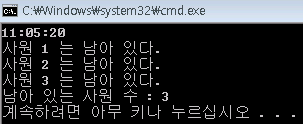
09:12:23 11:14:35 10:34:31 13:23:40 10:34:31 11:20:10 09:14:23 11:14:35 10:00:21 22:23:44 11:34:31 21:23:11 12:12:23 20:14:36 08:34:11 13:23:42 10:34:31 11:47:13 10:32:30 10:47:13
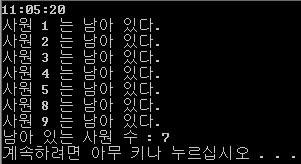
#include <stdio.h>
#include <stdlib.h>
#include <string.h>
#define MAX_COLS 10000

struct Time{
    int hour;
    int minute;
    int second;
};

Time stot(char* s);
bool compare(Time s, Time e, Time t);

void main() {
    int count = 0;
    Time t;
    char input[50];

    scanf("%s", input);

    t = stot(input);


    FILE* f = fopen("log.txt", "rt");

    char t1[9];
    char t2[9];
    char s[MAX_COLS];
    int i = 0;
    while(fgets(s, MAX_COLS, f)!=NULL) {
        Time start;
        Time end;
        strncpy(t1, &s[0], 8);
        t1[8] = '\0';
        strncpy(t2, &s[9], 8);
        t2[8] = '\0';
        start = stot(t1);
        end = stot(t2);
        i++;
        if(compare(start, end, t)) {
            count++;
            printf("사원 %d 는 남아 있다.\n", i);
        }
    }
    printf("남아 있는 사원 수 : %d \n", count);
    fcloseall();
}

 Time stot(char* s) {
    char temp[3];
    Time t;

    t.hour   = atoi(strncpy(temp, s, 2));
    s = s+3;
    t.minute = atoi(strncpy(temp, s, 2));
    s = s+3;
    t.second = atoi(strncpy(temp, s, 2));

    return t;
}

bool compare(Time s, Time e, Time t) {
    bool b1 = false;
    bool b2 = false;
    if(s.hour < t.hour)
        b1 = true;
    if(s.hour == t.hour) {
        if(s.minute < t.minute)
            b1 = true;
        else if(s.minute == t.minute)
            if(s.second < t.second)
                b1 = true;
    }

    if(e.hour > t.hour)
        b2 = true;
    if(e.hour == t.hour) {
        if(e.minute > t.minute)
            b2 = true;
        else if(e.minute == t.minute)
            if(e.second > t.second)
                b2 = true;
    }


    if(b1&&b2)
        return true;
    return false;
}
def devideTime(line):
    return int(line[0:2]), int(line[3:5]), int(line[6:8])

def checkPeople(t,logFile):
    with open(logFile,"r") as f:
        lines = f.readlines()

    tH,tM,tS = devideTime(t)
    print(tH,tM,tS)
    H,M,S=0,0,0
    st, ed = 0, 0
    count = 0
    for i,line in enumerate(lines):
        st = line[0:8]
        print(st)
        H,M,S = devideTime(st)
        if tH < H or ((tH == H) and tM < M) or ((tH == H) and (tM == M) and tS <= S) or line == lines[-1]:
            for j, line in enumerate(lines[:i]):
                ed = line[9:17]
                H,M,S = devideTime(ed)
                if tH < H or ((tH == H) and tM < M) or ((tH == H) and (tM == M) and tS <= S):
                    print(line)
                    count += 1
            break
    print(count)

checkPeople("11:30:20",'log')
#define _CRT_SECURE_NO_WARNINGS
#include <iostream>
#include <windows.h>
#include <stdio.h>
#include <string>


using namespace std;
char Rushlog[6][9] = { {"09:12:23"}, {"11:14:35"}, {"10:34:01"}, {"13:23:40"},{"10:34:31"},{"11:20:10"} };
int ConvertedValue[6] = { 0, };
int countEmp(char*);
void main() {
    char inputTIme[9];
    cout << "특정시간을 입력(예:11:05:20) : ";
    cin >> inputTIme;   //시간을 입력 받는다.
    cout << "남은 사원 수 : " << countEmp(inputTIme) << endl;
    system("pause");
}
int countEmp(char* inputTime) {
    int count = 0, check;
    int inputSeco = 0;
    char* rst;
    for (int i = 0; i < sizeof(Rushlog) / sizeof(Rushlog[0]); i++) {
        //이렇게 for문을 다 돌고나면
        //ConvertVale[6]은 초로변환된값들을 갖게된다
        check = 0;
        rst = strtok(Rushlog[i], ":");
        // : 구분자로 시간을 구분한후 시,분을 모두 초로 바꾼다
        while (rst != NULL) {
            switch (check)
            {
            case 0:
                ConvertedValue[i] += atoi(rst) * 3600;
                break;
            case 1:
                ConvertedValue[i] += atoi(rst) * 60;
                break;
            case 2:
                ConvertedValue[i] += atoi(rst);
                break;
            }
            rst = strtok(NULL, ":");
            check++;
        }
    }
    //여기선 입력한 시간을 초로 변환
    rst = strtok(inputTime, ":");
    check = 0;
    while (rst != NULL) {
        switch (check)
        {
        case 0:
            if (atoi(rst) > 24) {
                cout << "잘못 된 시간 입력" << endl;
            }
            inputSeco += atoi(rst) * 3600;
            break;
        case 1:
            if (atoi(rst) > 59) {
                cout << "잘못 된 분 입력" << endl;
            }
            inputSeco += atoi(rst) * 60;
            break;
        case 2:
            if (atoi(rst) > 59) {
                cout << "잘못 된 초 입력" << endl;
            }
            inputSeco += atoi(rst);
            break;
        }
        check++;
        rst = strtok(NULL, ":");
    }//비교해서 남아있는 사원 count
    for (int i = 0; i < sizeof(ConvertedValue) / sizeof(ConvertedValue[0]); i += 2){
        if (ConvertedValue[i] < inputSeco && inputSeco < ConvertedValue[i+1]) {
            count++;
        }
    }
    return count;

}
import random
count, time1, time2 = 0,list(),list()
time = [random.randint(8,18),random.randint(0,59),random.randint(0,59)]
for x in range(10):
    h1, h2 = random.randint(8,12), random.randint(12,18)
    m1, m2 = random.randint(0,59), random.randint(0,59)
    s1, s2 = random.randint(0,59), random.randint(0,59)
    time1.append([h1,m1,s1])
    time2.append([h2,m2,s2])
for x in range(10):
    print('%02d:%02d:%02d' % (time1[x][0],time1[x][1],time1[x][2]), \
          '%02d:%02d:%02d' % (time1[x][0],time1[x][1],time1[x][2]))
    if time1[x] <= time <= time2[x]:
        count += 1
print('%02d:%02d:%02d' % (time[0],time[1],time[2]),\
      '인원 : %d' % count)

#### 2017.01.27 D-391 ####
#include <stdio.h>

int CntMember(char *time)
{
    const int SIZE_LOG_ELEMENT = 8;
    const int SIZE_LOG = SIZE_LOG_ELEMENT + 1 + SIZE_LOG_ELEMENT;
    const int START_SECOND_TIME = 9;

    FILE *fp;
    char buffer[1024];
    int retval;

    int cnt = 0;

    if (fopen_s(&fp, "log.txt", "r") == 0)
    {
        while ((retval = fread_s(buffer, 1024, 1, 1024, fp)) > 0)
        {
            int idx_start = 0;
            while (retval >= SIZE_LOG)
            {
                bool b1 = false;
                bool b2 = false;
                for (int i = 0; i < SIZE_LOG_ELEMENT; i++)
                {
                    if (!b1)
                    {
                        if (buffer[idx_start + i] < time[i])
                        {
                            b1 = true;
                        }
                        else if (buffer[idx_start + i] == time[i])
                            continue;
                        else
                            break;
                    }

                    if (!b2)
                    {
                        if (buffer[idx_start + START_SECOND_TIME + i] > time[i])
                        {
                            b2 = true;
                        }
                        else if (time[i] == buffer[idx_start + START_SECOND_TIME + i])
                            continue;
                        else
                            break;
                    }

                    if (b1 && b2)
                    {
                        cnt++;
                        break;
                    }
                }

                retval -= SIZE_LOG;
                idx_start += SIZE_LOG;

                while (buffer[idx_start]< '0' || buffer[idx_start] > '9')
                {
                    retval--;
                    idx_start++;
                }

            }
        }

        fclose(fp);
        return cnt;
    }
    return -1;
}
int main()
{
    printf("cnt = %d\n", CntMember("11:10:11"));
}
MATLAB입니다. 입출문 시간 로그파일을 읽어서 입문시각 <= 기준시각 <= 출문시각인 경우 +1 하는 식으로 처리하였습니다.
criterion_time_txt='11:05:20';
criterion_time_arr=sscanf(criterion_time_txt,'%02d:%02d:%02d');
criterion_time_sec=criterion_time_arr(1)*3600+criterion_time_arr(2)*60+criterion_time_arr(3);

% log filename
filename='in_out_log_file.dat';

% check if file exists
if exist(filename)==0
    disp(['no file exist : ' filename]);
    return
end

% open the file
fileID=fopen(filename);

% reset
employee_cnt=0;

while ~feof(fileID)
    in_out_time_txt=fgetl(fileID);
    in_out_time_arr=sscanf(in_out_time_txt,'%02d:%02d:%02d %02d:%02d:%02d');
    in__time_sec=in_out_time_arr(1)*3600+in_out_time_arr(2)*60+in_out_time_arr(3);
    out_time_sec=in_out_time_arr(4)*3600+in_out_time_arr(6)*60+in_out_time_arr(6);

    % compare time
    if out_time_sec >= criterion_time_sec && criterion_time_sec >= in__time_sec
        employee_cnt=employee_cnt+1;
    end

end
fclose(fileID);

disp([criterion_time_txt ' 에 있던 직원 수 : ' num2str(employee_cnt)]);
def time_to_sec(time):
    second = 0
    temp = time.split(":")
    for i in range(len(temp)):
        if (i==0) : second += int(temp[i])*60*60
        elif (i==1) : second += int(temp[i])*60
        else : second += int(temp[i])
    return second


def f_count(str,input):
    count = 0
    each = str.split("\n")
    for work in each:
        temp = work.split(" ")
        if time_to_sec(temp[0]) < time_to_sec(input) < time_to_sec(temp[1]):
            count += 1
    return count


total_status = "09:12:23 11:14:35\n10:34:01 13:23:40\n10:34:31 11:20:10"
user_input = "11:05:20"
print f_count(total_status,user_input)
// 출퇴근 분석기 - C#
using System;
using System.Collections.Generic;
namespace Working
{
    class Program
    {
        static void Main(string[] args)
        {
            List<int[]> inin = new List<int[]>();
            List<int[]> outout = new List<int[]>();
            int count = 1;
            while (true)
            {
                try
                {
                    NO:
                    Console.Write("{0}. ", count);
                    string input = Console.ReadLine();
                    int[] tin = new int[3]; int[] tout = new int[3];
                    for (int i = 0; i < 6; i++)
                    {
                        string temp = input.Split(' ')[i / 3];
                        if (i / 3 == 0)
                            tin[i % 3] = int.Parse(temp.Split(':')[i % 3]);
                        else
                            tout[i % 3] = int.Parse(temp.Split(':')[i % 3]);
                    }
                    if (tin[0] > 24 || tout[0] > 24 || tin[1] > 60 || tout[1] > 60 || tin[0] > 60 || tout[0] > 60)
                        goto NO;
                    count++; inin.Add(tin); outout.Add(tout);
                }
                catch { break; }
            }
            NAH:
            Console.Write("Input the target time>>>");
            int[] tt = new int[3];
            string inputt = Console.ReadLine();
            for (int i = 0; i < 3; i++)
            {
                tt[i] = int.Parse(inputt.Split(':')[i]);
                if ((i == 0 && tt[i] > 24) || (tt[i] > 60))
                    goto NAH;
            }
            int person = 0;
            for (int i = 0; i < count - 1; i++)
            {
                if (check(inin[i], outout[i], tt))
                    person++;
            }
            Console.WriteLine(person);
        }
        static bool check(int[] inin, int[] outout, int[] tt)
        {
            if (inin[0] < tt[0] || tt[0] < outout[0])
                return true;
            else if (inin[0] == tt[0] || tt[0] == outout[0])
                if (inin[1] <= tt[1] || tt[1] <= outout[1])
                    return true;
                else if (inin[1] == tt[1] || tt[1] == outout[1])
                    if (inin[2] <= tt[2] || tt[0] <= outout[2])
                        return true;
            return false;
        }
    }
}
import re
time="""09:12:23 11:14:35
10:34:01 13:23:40
10:34:31 11:20:10"""
insec=re.compile("(\d{2})\D(\d{2})\D(\d{2})\s(\d{2})\D(\d{2})\D(\d{2})")
result=insec.findall(time)
intime=[]
outtime=[]
for i in range(len(result)):
    intime.append(int(result[i][0])*60*60+int(result[i][1])*60+int(result[i][2]))
    outtime.append(int(result[i][3])*60*60+int(result[i][4])*60+int(result[i][5]))
livetime=input()
live=re.compile("(\d{2})\D(\d{2})\D(\d{2})")
ttt=live.findall(livetime)
for i in range(len(ttt)):
    ltime=(int(ttt[i][0])*60*60+int(ttt[i][1])*60+int(ttt[i][2]))

cnt=0
for i in range(len(intime)):
    if intime[i]<ltime and outtime[i]>ltime:
        cnt+=1
print(cnt)
Python 3으로 풀었습니다.
def how_many(time_logs, target):
    man_count = 0
    for time_log in time_logs.split('\n'):
        time = time_log.split()
        if time[0] <= target and target < time[1]:
            man_count += 1
            # print(time)
    return man_count

time_logs = '09:12:23 11:14:35\n10:34:01 13:23:40\n10:34:31 11:20:10'
target_time = '11:05:20'
print(how_many(time_logs, target_time))
[Python 3.6]
inOutLogArr = [
["09:12:23", "11:14:35"],
["10:34:01", "13:23:40"],
["10:34:31", "11:20:10"],
]

def countWorkPeople(curTime):
    return sum(1 for x in inOutLogArr if x[0] <= curTime <= x[1])

print(countWorkPeople("11:05:20"))
tot_t = """
09:12:23 11:14:35
10:34:01 13:23:40
10:34:31 11:20:10
""".split('\n')
tot_t = [x for x in tot_t if x!='']

def getCnt(target_time):
    cnt = 0
    target_time = int(target_time.replace(':',''))

    for line in tot_t:
        line = line.split(' ')
        if int(line[0].replace(':','')) <=target_time <= int(line[1].replace(':','')):
            cnt += 1
    print(cnt)

getCnt('11:05:20')
인원수가 한두 번만 필요한지, 계속해서 쓸 건지에 따라서 답이 달라질 것 같습니다.
만약 한 번 출력하고 끝이라면 문제에 로그가 정렬되어 있다는 말이 없기 때문에(출퇴근 기록이니 출근 시간으로 정렬되어 있다고 암묵적으로 생각할 수도 있겠습니다만)
가장 단순한 방법이 가장 좋은 방법이 됩니다. (데이터를 정렬하면 이미 O(nlogn) 이니까)
def count_in_office(filename, t):
    cnt = 0
    f = open(filename, 'r')

    while True:
        line = f.readline()
        if not line:
            break

        in_time, out_time = line.split()
        cnt += in_time <= t <= out_time

    f.close()
    return cnt

print(count_in_office('log.txt', '11:05:20'))
반면 로그 파일을 계속 써먹으려 한다면 초 단위로 테이블을 만드는 게 합리적입니다. 초기 비용은 크지만 그 후로는 O(1)이 되니까요.
# HH:MM:SS format
def time_to_sec(t):
    return int(t[:2]) * 3600 + int(t[3:5]) * 60 + int(t[6:])

def setup(filename):
    timetable = [0] * 60 * 60 * 24  # counters per second

    f = open(filename, 'r')
    while True:
        line = f.readline()
        if not line:
            break

        in_time, out_time = line.split(' ')
        in_time, out_time = time_to_sec(in_time), time_to_sec(out_time)

        for i in range(in_time, out_time):
            timetable[i] += 1

    f.close()
    return timetable

timetable = setup('log.txt')
print(timetable[time_to_sec('11:05:20')])
# -*- coding: utf-8 -*-
# python 3.6


def stime2sec(string):
    """hh:mm:ss --> 초(second)로 반환"""
    rst = list(map(int, string.split(":")))
    return rst[0] * 3600 + rst[1] * 60 + rst[2]


def count_wkr(log, chk_time):
    """로그을 읽어 chk_time이 포함되는 기록의 수 반환"""
    rst = [string.split() for string in [string for string in log.split("\n")]]
    rst = [(stime2sec(x), stime2sec(y)) for (x, y) in rst]
    result = [True for (x, y) in rst if x <= stime2sec(chk_time) < y]
    return len(result)


log = """09:12:23 11:14:35
10:34:01 13:23:40
10:34:31 11:20:10"""

print(count_wkr(log, "11:05:20"))
string = "09:12:23 11:14:35 \n 10:34:01 13:23:40 \n 10:34:31 11:20:10"

workA = 0
workB = 8
goHomeA = 9
goHomeB = 17
count = 0

strInput = input()
strInput = strInput.split(':')

for num in range(3):
 work = string[workA:workB].split(':')
 goHome = string[goHomeA:goHomeB].split(':')

 if work[0] < strInput[0]:
  if goHome[0] > strInput[0]:
   count = count + 1
   workA = workA + 9
   workB = workB + 9
   goHomeA = goHomeA + 9
   goHomeB = goHomeB + 9
   continue
  elif goHome[0] == strInput[0]:
   if goHome[1] > strInput[1]:
    count = count + 1
    workA = workA + 9
    workB = workB + 9
    goHomeA = goHomeA + 9
    goHomeB = goHomeB + 9
    continue
  elif goHome[0] >= strInput[0]:
   count = count + 1
   workA = workA + 9
   workB = workB + 9
   goHomeA = goHomeA + 9
   goHomeB = goHomeB + 9
   continue

 elif work[0] == strInput[0]:
  if work[1] <= strInput[1]:
   count = count + 1
   workA = workA + 9
   workB = workB + 9
   goHomeA = goHomeA + 9
   goHomeB = goHomeB + 9
   continue

print(count)
package codingdojang;
import java.util.Date; import java.util.Scanner;
public class ex31 {
public static void main(String[] args) {
    // TODO Auto-generated method stub

    Scanner sc = new Scanner(System.in);
    String input = sc.nextLine();

    String time[] = {"09:12:23 11:14:35",
            "10:34:01 13:23:40",
            "10:34:31 11:20:10"};
    int stime[][] = new int[time.length][3];
    int etime[][] = new int[time.length][3];

    String in[] = input.split(":");
    int iu[] = new int[in.length];

    for(int i=0; i<in.length; i++) {
        iu[i] = Integer.parseInt(in[i]);
    }

    for(int i=0; i<time.length; i++) {
        String parse[] = time[i].split(" ");

        for(int j=0; j<parse.length; j++) {

            String inp[] = parse[j].split(":");
            if(j==0) {
                stime[i][0] = Integer.parseInt(inp[0]);
                stime[i][1] = Integer.parseInt(inp[1]);
                stime[i][2] = Integer.parseInt(inp[2]);
            }
            else {
                etime[i][0] = Integer.parseInt(inp[0]);
                etime[i][1] = Integer.parseInt(inp[1]);
                etime[i][2] = Integer.parseInt(inp[2]);
            }
        }
    }
    Date d = new Date();
    d.setHours(iu[0]);
    d.setMinutes(iu[1]);
    d.setSeconds(iu[2]);
    Date sd = new Date();
    Date ed = new Date();
    int count = 0;

    for(int i=0; i<stime.length; i++) {
        sd.setHours(stime[i][0]);
        sd.setMinutes(stime[i][1]);
        sd.setSeconds(stime[i][2]);

        ed.setHours(etime[i][0]);
        ed.setMinutes(etime[i][1]);
        ed.setSeconds(etime[i][2]);

        if(d.getTime() - sd.getTime() >= 0 && ed.getTime() - d.getTime() >= 0) {
            count++;
        }
    }

    System.out.println(count);

}
}
from datetime import datetime

def is_inOffice(time):
    format = "%H:%M:%S"
    cnt = 0
    for d1, d2 in data:
        if datetime.strptime(d1, format) <= datetime.strptime(time, format) < datetime.strptime(d2, format):
            cnt += 1

    print(cnt)
time = raw_input("how many at HH MM SS: ")
a=time.split()
i=0
if (int(a[0]) >=0 and int(a[0]) <= 24 and int(a[1]) >= 0 and int(a[1]) <=60 and int(a[2]) >= 0 and int(a[2]) <=60):
    check_time = int(a[0])*3600+int(a[1])*60+int(a[2])
    f = open("work_time.log", "r")
    worktime = f.readlines()
    for t in worktime:
        t2  = t.split()
        in_t = t2[0]
        out_t = t2[1]
        (in_hh, in_mm, in_ss) = in_t.split(':')
        (out_hh, out_mm, out_ss) = out_t.split(':')
        in_time = int(in_hh)*3600+int(in_mm)*60+int(in_ss)
        out_time = int(out_hh)*3600+int(out_mm)*60+int(out_ss)
        if (check_time <= out_time) and (check_time >= in_time):
           i+=1
    f.close()
    print("%d worker(s) was/were working" % i)
else:
    print("wrong time!")
파이썬 3.6
# 입력된 시간값(time)과 로그 파일 각 행의 뒷요소(퇴근시간)을 비교하여 퇴근시간이 입력시간보다 느린행을 찾아 카운트합니다.
# (출근을해야 로그값이 생성되므로 비교대상에서는 제외합니다.)
# 1. 해당 로그 내용의 각 행을 요소로 하는 리스트 자료형으로 변환합니다.(=>logpair)
# 2. 각 행 요소를 다시 리스트로 변환하여 리스트 자료형으로 변환합니다.(=>logpairlist)
# 3. 각 행 요소의 뒷요소(퇴근시간)과 입력된 시간(time) 값을 [시간,분,초]형태로 리스트 자료형으로 변환하고,
#   시간 - > 분 -> 초 순으로 비교하여 퇴근시간의 값이 큰 경우 인원수(count)를 증가시고 해당 요소 비교를 마침니다.

log = """09:12:23 11:14:35
10:34:01 13:23:40
10:34:31 11:20:10"""

logpair = log.split('\n')
logpairlist = []
for i in range(len(logpair)):
    logpairlist.append(list(logpair[i].split(' ')))

def main(time):
    timelist = []
    timelist = time.split(':')
    end = []
    count = 0
    for i in range(len(logpairlist)):
        end = logpairlist[i][1].split(':')
        for i in range(len(timelist)):
            if int(end[i]) > int(timelist[i]):
                count += 1
                break
            elif int(end[i]) == int(timelist[i]):
                pass
            else:
                break
    print("\n",">>> %s 당시 사무실 인원 => %d 명"%(time,count),"\n")

if __name__ == "__main__":
    time = input( " ▶ 시간을 'HH:MM:SS' 형식으로 입력하세요 : ")
    main(time)
*결과값
 ▶ 시간을 'HH:MM:SS' 형식으로 입력하세요 : 11:05:20

 >>> 11:05:20 당시 사무실 인원 => 3 명
a= input()
b=[['09:12:23','11:14:35'],['10:34:01','13:23:40'],['10:34:31','11:20:11']] c=b[:]
heytime=[] count=0 for j in range(0,3): time=c[j][0] time3=c[j][1] time2=[] time4=[] for i in range(0,8): if(i==2 or i==5): continue time2.append(time[i]) time4.append(time3[i]) heytime.append(a[i]) timing = int(time2[0])(105) + int(time2[1])*(104) + int(time2[2])(103) +int(time2[3])*(102)+int(time2[4])(101)+int(time2[5])*(100) timing2 =int(time4[0])(105)+ int(time4[1])*(104) + int(time4[2])(103) +int(time4[3])*(102)+int(time4[4])(101)+int(time4[5])*(100) timing3 = int(heytime[0])(105)+ int(heytime[1])*(104) + int(heytime[2])(103) +int(heytime[3])*(102)+int(heytime[4])*(101)+int(heytime[5])*(100) print(timing) print(timing2) if(timing3>=timing and timing3<=timing2): count=count+1
print(count)
a= input()

b=[['09:12:23','11:14:35'],['10:34:01','13:23:40'],['10:34:31','11:20:11']]
c=b[:]

heytime=[]
count=0
for j in range(0,3):
        time=c[j][0]
        time3=c[j][1]
        time2=[]
        time4=[]
        for i in range(0,8):
                if(i==2 or i==5):
                        continue
                time2.append(time[i])
                time4.append(time3[i])
                heytime.append(a[i])
        timing = int(time2[0])*(10**5) + int(time2[1])*(10**4) + int(time2[2])*(10**3) +int(time2[3])*(10**2)+int(time2[4])*(10**1)+int(time2[5])*(10**0)
        timing2 =int(time4[0])*(10**5)+ int(time4[1])*(10**4) + int(time4[2])*(10**3) +int(time4[3])*(10**2)+int(time4[4])*(10**1)+int(time4[5])*(10**0)
        timing3 = int(heytime[0])*(10**5)+ int(heytime[1])*(10**4) + int(heytime[2])*(10**3) +int(heytime[3])*(10**2)+int(heytime[4])*(10**1)+int(heytime[5])*(10**0)
        print(timing)
        print(timing2)
        if(timing3>=timing and timing3<=timing2):
                count=count+1

print(count)
python입니다. 굳이 타임 함수를 쓰지 않고 그냥 비교해도 된다는것을 배워갑니다!! 수고하셨습니다
import re
import datetime as dt
import numpy as np
from pandas import DataFrame, Series

input_time = "11:05:20"

date_log = """09:12:23 11:14:35
10:34:01 13:23:40
10:34:31 11:20:10"""

p = re.compile("[0-9]+\:[0-9]+\:[0-9]+")
pp = p.findall(date_log)


def compare_time():
    count = 0
    a,b,c = input_time.split(":")
    for x in range(int(len(pp)/2)):
        h1, m1, s1 = pp[2*x].split(":")
        h2, m2, s2 = pp[2*x+1].split(":")
        if dt.time(int(h1), int(m1), int(s1)) <= dt.time(int(a), int(b), int(c)) <= dt.time(int(h2),int(m2), int(s2)):
            count += 1
    return count

compare_time()
import java.util.Scanner;
public class level_2_office_time {
public static void main(String[] args) {
  System.out.println("몇시인지 입력하세요. (24시간 단위로 입력하세요.)");
  Scanner sc = new Scanner(System.in);
  int hour = sc.nextInt();

  System.out.println("몇분인지 입력하세요.");
  int minute = sc.nextInt();

  System.out.println("몇초인지 입력하세요.");
  int second = sc.nextInt();
  sc.close();

  int specifictime = (hour * 3600) + (minute * 60) + second; //특정 시간을 초로 환산한 변수.
  int count = 0; // 특정 시간때에 사무실에 있는 인원수를 카운트할 변수.

  String inouts = "09:12:23 11:14:35,10:34:01 13:23:40,10:34:31 11:20:10"; // 직원 전원의 출퇴근.
  String replaceinouts1 = inouts.replace(":", ",");

  String replaceinouts2 = replaceinouts1.replace(" ", ","); // 완전히 각각의 숫자들로 분리시킴. 문자열상태

  String[] sarray; // 문자열을 쪼개넣을 배열 생성.
  sarray = replaceinouts2.split(","); // 배열에 문자열을 모두 쪼개넣음.

  int[] iarray = new int[sarray.length]; // 문자열을 숫자로 변환한것을 집어넣을 배열.

  for(int i = 0; i < sarray.length; i++) // 문자열을 모두 숫자로 변환시킴.
  {
      iarray[i] = Integer.parseInt(sarray[i]);
  }

  for(int i = 0; i < sarray.length; i++)
  {
      if(i % 3 == 0)
      {
          iarray[i] = iarray[i] * 3600;
      }
      if(i % 3 == 1)
      {
          iarray[i] = iarray[i] * 60;
      }
      if(i % 3 == 2)
      {
          iarray[i] = iarray[i];
      }
  }

  int[] sumarray = new int[sarray.length / 3]; // 시, 분, 초를 서로 더한 값을 배열에 넣는다.

  for(int i = 0; i < sarray.length; i++)
  {
      if(i % 3 == 0)
      {
          sumarray[i/3] = sumarray[i/3] + iarray[i];
      }
      if(i % 3 == 1)
      {
          sumarray[i/3] = sumarray[i/3] + iarray[i];
      }
      if(i % 3 == 2)
      {
          sumarray[i/3] = sumarray[i/3] + iarray[i];
      }
  }

  for(int i = 0; i < sumarray.length; i = i + 2)
  {
      if(sumarray[i] <= specifictime && sumarray[i + 1] >= specifictime)
      {
          count++;
      }
  }
  System.out.println(count);
} }
완전 노가다로 풀었습니다.
추천답안의 방법들 참고하였습니다.
# 파이썬

sample = """09:12:23 11:14:35
10:34:01 13:23:40
10:34:31 11:20:10"""


def person_in_office(log, time):
    log_list = log.split("\n")

    in_time = []
    out_time = []
    for m in log_list:
        in_time.append(int(m[0:2])*3600 + int(m[3:5])*60 + int(m[6:8]))
        out_time.append(int(m[9:11])*3600 + int(m[12:14])*60 + int(m[15:17]))
    time = int(time[0:2])*3600 + int(time[3:5])*60 + int(time[6:8])

    in_person = 0
    for m in in_time:
        if m < time:
            in_person += 1
    for n in out_time:
        if n < time:
            in_person -= 1
    return in_person


print(person_in_office(sample, "11:05:20"))
package timeSheet;

import java.util.Scanner;

public class TimeSheet {

    private int count(String[] str, String time) {

        int temp = convert(time);
        int count = 0;

        for (String ele : str)
            if (convert(ele) > temp)
                count++;

        return count;
    }

    private int convert(String time) {
        return Integer.parseInt(time.replace(":", ""));
    }

    public int timeSheet(String[] str, String time) {

        String[] prefix = new String[str.length];
        String[] remainder = new String[str.length];

        for (int i = 0; i < str.length; i++) {
            prefix[i] = str[i].substring(0, 8);
            remainder[i] = str[i].substring(9, str[i].length());
        }

        return count(remainder, time) - count(prefix, time);
    }

    public static void main(String[] args) {
        // TODO Auto-generated method stub

        TimeSheet ts = new TimeSheet();
        String[] str = { "09:12:23 11:14:35", "10:34:01 13:23:40", "10:34:31 11:20:10" };

//      @SuppressWarnings("resource")
//      Scanner sc = new Scanner(System.in);
//
//      System.out.println(ts.timeSheet(str, sc.nextLine()));
        System.out.println(ts.timeSheet(str, new String("11:05:20")));
        System.out.println(ts.timeSheet(str, new String("11:20:00")));
        System.out.println(ts.timeSheet(str, new String("09:20:00")));
    }

}
def countppl(a, time):
    result = 0
    for i in range(len(a)):
        if (a[i][0]-time)*(a[i][1]-time) <= 0:
            result += 1
    return result


a = ['09:12:23 11:14:35',
     '10:34:01 13:23:40',
     '10:34:31 11:20:10']
for i in range(len(a)):
    a[i] = a[i].split(' ')
    for j in range(len(a[i])):
        a[i][j] = a[i][j].split(':')
        a[i][j] = list(map(int, a[i][j]))
        a[i][j] = 3600 * a[i][j][0] + 60 * a[i][j][1] + a[i][j][2]
n = input("시간을 입력하시오 :")
n = list(map(int, n.split(':')))
n = 3600*n[0]+60*n[1]+n[2]
print(countppl(a,n))
def solve(filename,time):
    time_attend=[]
    time_leave=[]
    for_check_time=''
    for a in time.split(":"):
        for_check_time+=a
    f=open(filename)
    lines=f.readlines()
    for line in lines:
        time_attend.append(line.split(' ')[0])
        time_leave.append(line.split(' ')[1])

    counter=0
    for c in range(len(time_attend)):
        temp_time_attend=''
        for k in time_attend[c].split(":"):
            temp_time_attend+=k

        temp_time_leave=''
        for g in time_leave[c].split(":"):
            temp_time_leave+=g

        if int(for_check_time)>=int(temp_time_attend) and int(for_check_time)<=int(temp_time_leave):
            counter+=1

    return counter

solve(r"C:\..","11:05:20")
로그가 txt파일에 저장되어 있다고 가정.. 시간이 11:05:22 라면 110522 이렇게 이어붙여서 비교했습니다
import re

def commute(standard, commute) :

    commutor = 0

    stan = re.compile('(?P<sh>\d{2})[:](?P<sm>\d{2})[:](?P<ss>\d{2})')
    comm = re.compile('(\d+)[:](\d+)[:](\d+)\s+(\d+)[:](\d+)[:](\d{2})')

    stan_m = stan.match(standard)
    stand_sec = int(stan_m.group('sh'))*3600+int(stan_m.group('sm'))*60+int(stan_m.group('ss'))

    comm_list = comm.findall(str(commute))

    for commutime in comm_list :

        commute_s = int(commutime[0])*3600+int(commutime[1])*60+int(commutime[2])
        commute_e = int(commutime[3])*3600+int(commutime[4])*60+int(commutime[5])

        if commute_s <= stand_sec and commute_e > stand_sec :
            commutor += 1

    print (commutor)
데이터는 리스트 타입으로 주어졌다고 가정했습니다. 예 ) list_c = [ '11:53:22 19:24:43' '08:24:32 15:42:23' '08:33:22 19:22:54' '10:22:32 20:23:54' '10:24:33 22:12:42' '07:23:14 24:22:11' ]
import java.text.ParseException;
import java.text.SimpleDateFormat;
import java.util.ArrayList;
import java.util.Calendar;
import java.util.Date;
import java.util.List;
import java.util.Scanner;

public class TimeSheet {

    Date startDate;
    Date endDate;

    public TimeSheet(String startTime, String endTime){

        SimpleDateFormat sdf = new SimpleDateFormat("HH:mm:ss");

        try {
            this.startDate = sdf.parse(startTime);
            this.endDate = sdf.parse(endTime);
        } catch (ParseException e) {
            // TODO Auto-generated catch block
            e.printStackTrace();
        }

    }

    public Date getStartDate() {
        return startDate;
    }

    public void setStartDate(Date startDate) {
        this.startDate = startDate;
    }

    public Date getEndDate() {
        return endDate;
    }

    public void setEndDate(Date endDate) {
        this.endDate = endDate;
    }

    public static void main(String[] args) {
        // TODO Auto-generated method stub
        List<TimeSheet> log = new ArrayList<>();

        log.add(new TimeSheet("09:12:23", "11:14:35"));
        log.add(new TimeSheet("10:34:01", "13:23:40"));
        log.add(new TimeSheet("10:34:31", "11:20:10"));

        Scanner sc = new Scanner(System.in);

        String checkPoint = sc.next();

        sc.close();

        int count = 0;

        Calendar c = Calendar.getInstance();

        Date d = c.getTime();

        SimpleDateFormat sdf = new SimpleDateFormat("HH:mm:ss");

        try {
            d = sdf.parse(checkPoint);
        } catch (ParseException e) {
            // TODO Auto-generated catch block
            e.printStackTrace();
        }

        for(int i=0; i<log.size(); i++){
            if(log.get(i).getStartDate().getTime() <= d.getTime()){
                if(d.getTime() <= log.get(i).getEndDate().getTime()){
                    count++;
                }
            }
        }

        System.out.println(count);

    }

}
log = open("tt.txt", 'r')
log_time = log.read().split("\n")
n = len(log_time)
a = [log_time[i].split(" ") for i in range(0,n)]
time = input("time:").split(':')
time = int(''.join(time))
count = 0
for i in range(0,n):
    time_i = a[i][0].split(':')
    time_i = int(''.join(time_i))
    time_f = a[i][1].split(':')
    time_f = int(''.join(time_f))
    if time_i < time < time_f:
        count = count +1
print(count)
    var ch_1 = ["09:12:23", "11:14:35"];
    var ch_2 = ["10:34:01", "13:23:40"];
    var ch_3 = ["10:34:31", "11:20:10"];
    var ch_list = [ch_1, ch_2, ch_3];

    function time_cal (t) {
    return ( (Number(t[0]) * 10 + Number(t[1]) ) * 60 + Number(t[3]) * 10 +Number(t[4]) ) * 60 + Number(t[6]) * 10 + Number(t[7])
    };


    function check (t) {
      var count = 0;
      for (var i = 0; i < ch_list.length; i++) {
        if( time_cal(ch_list[i][0]) <= time_cal(t) && time_cal(t) <= time_cal(ch_list[i][1])) {
          count += 1; }
        };
        return  count;
      }
import sys

if __name__=='__main__':
    c = 0
    trip1 = sys.stdin.readline().strip().split(",")
    trip2 = sys.stdin.readline().strip().split(":")
    t3 = int(trip2[0]) * 60 * 60 + int(trip2[1]) * 60 + int(trip2[2])
    for i in trip1:
        a1 = i.split(" ")
        n2 = a1[0].split(':')
        t1 = int(n2[0]) * 60 * 60 + int(n2[1]) * 60 + int(n2[2])
        n3 = a1[1].split(':')
        t2 = int(n3[0]) * 60 * 60 + int(n3[1]) * 60 + int(n3[2])
        if t1 <= t3 <= t2:
            c = c + 1
        else:
            pass
    print(c)
count = 0
c = '11:05:20'
c = 3600 * int(c[0:2]) + 60 * int(c[3:5]) + int(c[6:8])
while True:
    try:
        a, b = input().split()
        a = 3600 * int(a[0:2]) + 60 * int(a[3:5]) + int(a[6:8])
        b = 3600 * int(b[0:2]) + 60 * int(b[3:5]) + int(b[6:8])
        if((a<c) & (c<b)):
            count = count + 1
    except:
        break
print(count)
python3 + 입니다.
import datetime

f = open("c:\\list.txt", 'r')


time_list = [l for l in f.readlines()]

def make_datetime(time_txt):
    return datetime.datetime.combine(datetime.date.today(), datetime.time(int(time_txt[0:2]), int(time_txt[3:5]), int(time_txt[6:8])))

def contain_time(base_time, start_time, end_time):
    if start_time <= base_time and end_time >= base_time:
        return 1
    return 0

count = 0
for t_txt in time_list:
    t_split = t_txt.split(' ')
    count += contain_time(make_datetime("11:05:20"), make_datetime(t_split[0]), make_datetime(t_split[1]))

print(count)
// 그 시간 사무실에 몇 명이 있었나?
package main

import (
    "fmt"
    "strings"
)

func main() {
    log := `09:12:23 11:14:35
10:34:01 13:23:40
10:34:31 11:20:10`
    chkTime := "11:05:20"
    fmt.Println(CountIn(chkTime, log))
}

// parse & check log
func CountIn(chkTime, logTime string) int {
    count := 0
    var each []string
    for _, v := range strings.Split(logTime, "\n") {
        each = strings.Split(v, " ")
        if isIn(chkTime, each[0], each[1]) {
            count++
        }
    }
    return count
}

// check chkTime in [onTime..offTime]
func isIn(chkTime, onTime, offTime string) bool {
    chk := time2sec(chkTime)
    return time2sec(onTime) <= chk && chk <= time2sec(offTime)
}

// a String "hh:mm:ss" to an integer(seconds)
func time2sec(aString string) int {
    var hh, mm, ss int
    fmt.Sscanf(aString, "%2d:%2d:%2d", &hh, &mm, &ss)
    return ss + mm*60 + hh*60*60
}
Swift입니다.
Kim Jaeju님 풀이에서 특정 시간 전에 출근한 사람에서 퇴근한 사람을 뺀다는 아이디어를 이용했습니다. 출근한 시간을 숫자로 바꿔서 출근 배열에 넣고, 마찬가지로 퇴근 시간도 배열에 넣었습니다. 특정 시간이 주어지면 filter를 이용해서 특정 시간 기준 출근한 사람과 퇴근한 사람을 뺐습니다.
import Foundation

let givenLog = [["09:12:23", "11:14:35"], ["10:34:01", "13:23:40"], ["10:34:31", "11:20:10"]]

func getTime(_ timeString: String) -> Int {
    var times = timeString.split(separator: ":")
    return Int(times[0])! * 3600 + Int(times[1])! * 60 + Int(times[2])!
}

func getPersonCount(_ logs: [[String]], _ time: String) -> Int {
    var inTimes = [Int]()
    var outTimes = [Int]()

    for item in logs {
        inTimes.append(getTime(item[0]))
        outTimes.append(getTime(item[1]))
    }

    let targetTime = getTime(time)
    let inCount = inTimes.filter { $0 <= targetTime}.count
    let outCount = outTimes.filter { $0 <= targetTime}.count

    return inCount - outCount
}

print( getPersonCount(givenLog, "10:34:31"))
def office1(www):
    fp = open("D:/officehour.txt",'r')
    data = fp.readlines()
    mylist =[]
    import time, datetime
    var = time.strptime(str(www), "%H:%M:%S")
    varsec = datetime.timedelta(hours=var.tm_hour, minutes=var.tm_min, seconds=var.tm_sec).seconds
    for i in data:
        come = time.strptime(i.split(" ")[0], "%H:%M:%S")
        comesec = datetime.timedelta(hours=come.tm_hour,minutes=come.tm_min,seconds=come.tm_sec).seconds
        go = time.strptime(i.split(" ")[1].strip(), "%H:%M:%S")
        gosec = datetime.timedelta(hours=go.tm_hour,minutes=go.tm_min,seconds=go.tm_sec).seconds
        if comesec < varsec < gosec:
            mylist.append(varsec)
    return len(mylist)


print(office1("11:05:20"))
``````{.python}
ㄹ
public class CountMember {
    String[] times={"09:12:23 11:14:35","10:34:01 13:23:40","10:34:31 11:20:10"};
    int cntMem=0;

    public int count(String time){
        cntMem=0;
        for(String t : times){
            int s=replaceTime(t.split(" ")[0]);
            int e=replaceTime(t.split(" ")[1]);
            int ti=replaceTime(time);
            if(s<=ti && e>=ti){
                cntMem++;
            }
        }
        return cntMem;

    }

    public int replaceTime(String time){
        return Integer.parseInt(time.replaceAll(":",""));
    }

    public static void main(String args[]){
        System.out.println("count Member is ..."+new CountMember().count("11:05:20"));
    }

}
python3
def getValue(s):
    val = 0
    time = s.split(":")
    val = int(time[0])*3600 + int(time[1])*60 + int(time[2])
    return val

specific_time = input()
specific_val = getValue(specific_time)


arr = ["09:12:23 11:14:35",
       "10:34:01 13:23:40",
       "10:34:31 11:20:10"
       ]

person = []
cnt = 0

for i in range(len(arr)):
    workingtime = arr[i].split()
    s = getValue(workingtime[0])
    e = getValue(workingtime[1])
    if specific_val >= s and specific_val <= e :
        cnt += 1
print(cnt)
Python
test = ["09:12:23 11:14:35", "10:34:01 13:23:40", "10:34:31 11:20:10"]
#test.append(file.readlines())
n = "10:05:20"
n = n.split(":")
n = int(n[0]) * 3600 + int(n[1]) * 60 + int(n[2])
ans = 0
for t in test:
    in_time, out_time = t.split(" ")
    in_time = in_time.split(":")
    out_time = out_time.split(":")
    in_time = int(in_time[0])*3600+int(in_time[1])*60+int(in_time[2])
    out_time = int(out_time[0])*3600+int(out_time[1])*60+int(out_time[2])
    if in_time <= n <= out_time:
        ans += 1
print(ans)
파이썬으로 문제를 해결했습니다. 이 문제는 두 가지 방법으로 해결이 가능할 듯 합니다. 1. 데이터분석 라이브러리 판다스 사용 - 판다스에는 datetime이라는 데이터형이 존재합니다. 이를 사용하면 간단하게 비교 분석이 가능합니다.
- 초로 바꾸어 계산하는 방법
- 다른 분들이 많이 사용하셨는데 시간을 초단위로 바꾸어 단위를 통일시켜 계산합니다.
# 1
data = [["09:12:23", "11:14:35"],
        ["10:34:01", "13:23:40"],
        ["10:34:31", "11:20:10"]]

input1 = "11:05:20"

import pandas as pd
input2 = pd.to_datetime(input1)

count = 0
for s, e in data:
    s, e = pd.to_datetime(s), pd.to_datetime(e)
    if (input2 >= s and e >= input2):
        count += 1
print(count)

####################################################

# 2
input2 = list(map(int, input1.split(':')))
input2 = (input2[0] * 60 + input2[1]) * 60 + input2[2]
count = 0
for s, e in data:
    s = list(map(int, s.split(':')))
    e = list(map(int, e.split(':')))

    s = (s[0] * 60 + s[1]) * 60 + s[2]
    e = (e[0] * 60 + e[1]) * 60 + e[2]

    if input2 >= s and input2 <= e:
        count +=1

print(count)
텍스트 비교만으로도 가능하네요
vlist = [
'09:12:23 11:14:35',
'10:34:01 13:23:40',
'10:34:31 11:20:10',
]

pivotTime = '11:05:20'
headCount = 0

for i in range(len(vlist)):
    inoutTime = vlist[i]
    if inoutTime[0:8] <= pivotTime <= inoutTime[9:17]:
        headCount +=1

print(headCount)
def time_scon(time):
    return time.split(':')[0]*60*60+time.split(':')[1]*60+time.split(':')[2]
def worker(time):
    log = ['09:12:23 11:14:35','10:34:01 13:23:40','10:34:31 11:20:10']
    count = 0
    for i in log:
        tmp = i.split()
        if time_scon(tmp[0]) <= time_scon(time) <= time_scon(tmp[1]): count += 1
    return count
print(worker('11:05:20'))
print(worker('09:35:20'))
파이썬3
data1 = """09:12:23 11:14:35
10:34:01 13:23:40
10:34:31 11:20:10"""

def t_converter(t):
    list1 = t.split(":")
    return list1[0] * 60 * 60 + list1[1] * 60 + list1[2]

def in_office(log_line, t):
    start_time = t_converter(log_line.split(" ")[0])
    end_time = t_converter(log_line.split(" ")[1])
    point_time = t_converter(t)

    if start_time <= point_time <= end_time:
        return True
    else:
        return False

def counter(data, t):
    count = 0
    list1 = data.split("\n")
    for i in list1:
        if in_office(i, t):
            count += 1
    return count

print(counter(data1, "11:05:20")) #3
// 그 시간 사무실에 몇 명이 있었나?
package com.company;

import java.io.*;
import java.util.Scanner;

public class Main {

    public static void main(String[] args) throws IOException {
        String st;
        String stArr[];
        Scanner sc = new Scanner(System.in);
        System.out.print("시간 입력: ");
        int ti = time(sc.next());
        File file = new File("test.txt");
        BufferedReader br = new BufferedReader(new FileReader(file));
        int count = 0;
        while((st = br.readLine()) != null)
        {
            stArr = st.split(" ");
            if((time(stArr[0]) < ti) && time(stArr[1]) > ti) // 입력한시간이 사이에 있으면
                count++;
        }
        System.out.println(count + "명");
    }
    public static int time(String st)
    {
        int tt = 0;
        String[] str = st.split(":");
        tt += Integer.valueOf(str[0]) * 3600;
        tt += Integer.valueOf(str[1]) * 60;
        tt += Integer.valueOf(str[2]);
        return tt;
    }
}
    class Program
    {
        private const string strTime = "11:05:20";

        string[] arrayTimes={"09:12:23 11:14:35","10:34:01 13:23:40","10:34:31 11:20:10"};

        static void Main(string[] args)
        {
            Console.WriteLine(String.Format("근무했던 사람 수 : {0}", new Program().count(strTime)));
        }
        public int count(String time)
        {
            int nCnt = 0;

            for (int i = 0; i < arrayTimes.Length; i++)
            {
                int nStart = replaceManual(arrayTimes[i].Split(' ')[0]);
                int nEnd = replaceManual(arrayTimes[i].Split(' ')[1]);
                int ti=replaceManual(time);

                if (nStart <= ti && nEnd >= ti)
                {
                    nCnt++;
                }
            }
            return nCnt;
        }
        public int replaceManual(string time)
        {
            return int.Parse(time.Replace(":",""));
        }
def time(n):
     t,o = [],0
     for x in range(n):
          i = input('time : ').split()
          i = [i[0].split(':'),i[1].split(':')]
          t.append([int(i[0][0])*3600 + int(i[0][1])*60 + int(i[0][2]), int(i[1][0])*3600 + int(i[1][1])*60 + int(i[1][2])])

     i = input('when : ').split(':')
     i = int(i[0]) * 3600 + int(i[1]) * 60 + int(i[2])
     for x in t:
          if x[0] <= i <=x[1]:
               o += 1
     print('%s명이 있었다' %(o))
def time(n):
     t,o = [],0
     for x in range(n):
          i = input('time : ').split()
          i = [i[0].split(':'),i[1].split(':')]
          t.append([int(i[0][0])*3600 + int(i[0][1])*60 + int(i[0][2]), int(i[1][0])*3600 + int(i[1][1])*60 + int(i[1][2])])

     i = input('when : ').split(':')
     i = int(i[0]) * 3600 + int(i[1]) * 60 + int(i[2])
     for x in t:
          if x[0] <= i <=x[1]:
               o += 1
     print('%s명이 있었다' %(o))
def time(n):
     t,o = [],0
     for x in range(n):
          i = input('time : ').split()
          i = [i[0].split(':'),i[1].split(':')]
          t.append([int(i[0][0])*3600 + int(i[0][1])*60 + int(i[0][2]), int(i[1][0])*3600 + int(i[1][1])*60 + int(i[1][2])])

     i = input('when : ').split(':')
     i = int(i[0]) * 3600 + int(i[1]) * 60 + int(i[2])
     for x in t:
          if x[0] <= i <=x[1]:
               o += 1
     print('%s명이 있었다' %(o))
출근부로 만들어봤습니다.
#출근부
a = open('on_off.txt', 'w')
a.write('''09:12:23 11:14:35
10:34:01 13:23:40
10:34:31 11:20:10''')
a.close()

#읽기
a = open('on_off.txt', 'r')

#시간 형식의 실수 반환
def tt(n):
    k = int(n.split(':')[0])*60*60 + int(n.split(':')[1])*60 + int(n.split(':')[2])
    return k

#출근한 사람 수
p = a.read().split('\n') #split은 자동으로 list를 만들어주는 듯...

# 해당 시간에 있었던 사람의 수
def T(t):
    r = 0
    for i in p:
        if t in range(tt(i.split(' ')[0]), tt(i.split(' ')[1])):
            r += 1
    return r
print(T(tt('10:36:00')))
파일로 한다길래 파일 입출력을 사용해서 작성해 보았습니다. 파일은 예시와 동일하게 되어있습니다.
import os

log = open('log.txt','r')

time = input('Time (24hr) : ')

def sec(arr):
    tmp = arr.split(':')
    SS = int(tmp.pop())
    MM = int(tmp.pop())
    HH = int(tmp.pop())

    return SS + MM * 60 + HH * 3600

cnt = 0
while True:
    line = log.readline()
    if not line:
        break
    arr = line.split(' ')
    for i in range(len(arr)):
        arr[i] = arr[i].replace('\n','')

    if sec(arr[0]) < sec(time) < sec(arr[1]):
        cnt += 1


print (cnt,'명 입니다.')
log.close()
C#
using System;
using System.Linq;
using System.IO;

namespace CD031
{
    class Program
    {
        static void Main()
        {
            string timeLog = File.ReadAllText(@"C:\temp\test.log"); // 로그파일 경로
            string checkTime = "11:05:20";

            int count = 0;
            foreach (var aLog in timeLog.Split('\n'))
            {
                var time = aLog.Trim().Split();
                if (IsBetween(time[0], time[1], checkTime)) { count++; }
            }
            Console.WriteLine(count);
        }

        static bool IsBetween(string beginTime, string endTime, string checkTime)
            => Time2Sec(beginTime) <= Time2Sec(checkTime) && Time2Sec(checkTime) <= Time2Sec(endTime);

        static int Time2Sec(string aString) // 시간 문자열을 초(int)로 변환
        {
            var time = aString.Split(':').Select(int.Parse).ToArray();
            return time[0] * 3600 + time[1] * 60 + time[2];
        }
    }
}
문제 해결 키포인트는
우리가 원하는 해당 시간을 00시 00분 00초부터의 초로 변환해서
출근시간 <= 원하는 해당 시간 <= 퇴근시간을 만족하면 근무인원을 올리는 방법임


# Logfile 정의
logfile = '09:12:23 11:14:35\n10:34:01 13:23:40\n10:34:31 11:20:10'

# Hour:Minute:Second 형의 시간을 해당 일 00시 00분 00초부터의 초로 변환해주는 함수
def TimeToSecond(string):
  time_list = string.split(":")
  time_list = list(map(int, time_list))
  time_list = time_list[0]*3600 + time_list[1]*60 + time_list[2]
  return time_list

# 최종 목적 함수
def count_employee(logfile, time):
  prep_logfile = logfile.split("\n")

  emp_in = []
  emp_out = []

  emp = 0
  for prep_log in prep_logfile:
    indv_prep = prep_log.split(' ')
    emp_in.append(TimeToSecond(indv_prep[0]))
    emp_out.append(TimeToSecond(indv_prep[1]))

  del prep_logfile, indv_prep

  time = TImeToSecond(time)

  for t1, t2 in list(zip(emp_in, emp_out)):
    if t1 <= time <= t2:
      emp += 1
    else:
      continue

  return emp
import java.io.BufferedReader;
import java.io.File;
import java.io.FileReader;
import java.io.IOException;
import java.util.Scanner;

public class KimSanghyeop
{
    public static void main(String[] args) throws IOException
    {
        File file = new File("src\\hello\\time.txt");
        BufferedReader br = new BufferedReader(new FileReader(file));

        Scanner sc = new Scanner(System.in);
        System.out.println("특정시간을 입력하세요.");
        int time = time_check(sc.nextLine());

        String temp;
        String[] arr;
        int before, after;
        int cnt=0;
        while((temp = br.readLine()) != null)
        {
            arr =temp.split(" ");
            before=time_check(arr[0]);
            after=time_check(arr[1]);

            if(before <= time && after >= time)
            {
                cnt+=1;
            }
        }

        System.out.println("존재사람 : "+cnt);

    }

    static int time_check(String time)
    {
        int res=0;

        String[] hms = time.split(":");
        res += Integer.parseInt(hms[0])*3600;
        res += Integer.parseInt(hms[1])*60;
        res += Integer.parseInt(hms[2])*1;

        return res;
    }
}
def count(hrminsec):
    [hr, min, sec] = hrminsec.split(':')
    cnt = 0
    ctime = '''09:12:23 11:14:35
    10:34:01 13:23:40
    10:34:31 11:20:10'''
    ctimes = ctime.split()
    secinp = 3600 * hr + 60 * min + sec
    for i in range(0, len(ctimes), 2):
        hri, mini, seci = ctimes[i][:2], ctimes[i][3:5], ctimes[i][6:]
        hro, mino, seco = ctimes[i+1][:2], ctimes[i+1][3:5], ctimes[i+1][6:]

        secii = 3600 * hri + 60 * mini + seci
        secoo = 3600 * hro + 60 * mino + seco

        if secii <= secinp < secoo: cnt += 1

    print(cnt)
    return

count('11:15:00')
답 : 2
data = ['09:12:23 11:14:35','10:34:01 13:23:40','10:34:31 11:20:10']
H,M,S=input('HH:MM:SS 입력:').split(':')
inputs=int(H)*3600+int(M)*60+int(S)
count = 0

for i in range(len(data)):
    h,m,s = data[i].split(' ')[0].split(':')
    a=int(h)*3600+int(m)*60+int(s)
    h,m,s = data[i].split(' ')[1].split(':')
    b=int(h)*3600+int(m)*60+int(s)
    if a <= inputs <= b:
        count+=1
print(count)
def people(a):
    a = int(''.join(a.split(':')))

    return a


def how_many(filename):
    t = input()
    time = int(''.join(t.split(':')))
    with open (filename, 'r') as file:
        lines = file.readlines()

        start = []
        end = []
        cnt = 0

        for i in lines:
            i.strip('\n')
            a, b = i.split(' ')
            start.append(people(a))
            end.append(people(b))
            cnt += 1

        start.append(time); start.sort()
        end.append(time); end.sort()

        num = start.index(time) - end.index(time)

    return num

print(how_many('No.31_login.log'))
time_rec = ['09:12:23', '11:14:35', '10:34:01', '13:23:40', '10:34:31', '11:20:10']
time_pos = '11:05:20'

def convert_to_int(time):
    time_split = time.split(':')
    return int(time_split[0])*60*60 + int(time_split[1])*60 + int(time_split[2])

def check_time_is_in(time, start, end):
    if convert_to_int(start) <= convert_to_int(time) <= convert_to_int(end):
        return True
    return False

cnt = 0
for i in range(0, len(time_rec), 2):
    if True == check_time_is_in(time_pos, time_rec[i], time_rec[i + 1]):
        cnt += 1
print(cnt)
const logFile
= [{in:33143, out:40475},
   {in:38041, out:48190},
   {in:38071, out:40810}]

function howManyPeople(input){
  const splitted = input.split(':')
  const sum = Number(splitted[0])*60*60+Number(splitted[1])*60+Number(splitted[2])
  let result = 0
  for(let i = 0 ; i<logFile.length;i++){
    if(logFile[i].in<=sum && sum<=logFile[i].out){
      result+=1
    }
  }
  return `${input}에 총 ${result}명의 사람이 사무실에 있습니다.`
}

howManyPeople('11:05:20')
time_list = ['09:12:23 11:14:35','10:34:01 13:23:40','10:34:31 11:20:10']
count=0
time = input("시간 입력: ")
hh_in, mm_in, ss_in = time.split(':')


for i in range(0,len(time_list)):
    time_1, time_2 = time_list[i].split(' ')
    hh_1,mm_1,ss_1 = time_1.split(':')
    hh_2,mm_2,ss_2 = time_2.split(':')
    time_1 = hh_1+mm_1+ss_1
    time_2 = hh_2+mm_2+ss_2
    time = hh_in+mm_in+ss_in

    if time>=time_1 and time<=time_2:
        count+=1

print("%d명"%count)
namespace codingdojang__
{
    class Program
    {
        static void Main(string[] args)
        {
            int result = 0;
            result += Time("09:12:23", "11:14:35");
            result += Time("10:34:01", "13:23:40");
            result += Time("10:34:31", "11:20:10");
            Console.WriteLine(result);
        }
        static int Time(string go_to_work, string get_off_work)
        {
            int person = 0;
            string time = "11:05:20";
            string[] time_split = time.Split(':');
            bool g_t_w_bool = false;
            bool g_o_w_bool = false;

            string[] g_t_w = go_to_work.Split(':');
            string[] g_o_w = get_off_work.Split(':');

            for (int i = 0; i < 3; i++)
            {
                if (int.Parse(g_t_w[i]) < int.Parse(time_split[i]))
                {
                    g_t_w_bool = true;
                }
                if (int.Parse(g_o_w[i]) > int.Parse(time_split[i]))
                {
                    g_o_w_bool = true;
                }
            }

            if (g_t_w_bool == true && g_o_w_bool == true)
            {
                person++;
            }

            return person;
        }
    }
}
f = open('data.txt','r')
time = f.readlines()
f.close()
start, end = [],[]

inputdata = "11:05:20"
input = inputdata.split(':')
h = int(input[0])
m = int(input[1])
s = int(input[2])
check = h * 3600 + m* 60 + s

cnt=0
for data in time:
    newtime = data.split()
    start = newtime[0].split(':')
    end = newtime[1].split(':')

    starttime = int(start[0]) * 3600 + int(start[1]) * 60 + int(start[2])
    endtime = int(end[0]) * 3600 + int(end[1]) * 60 + int(end[2])
    if starttime <= check <= endtime:
        cnt += 1

print(cnt)
tn=int(input("출근인원수 입력:"));inp=[];print("각각의 출근/퇴근시각 입력\n")

def intt(L):
    for i in range(len(L)):
        L[i]=int(L[i])

for i in range(tn):
    a,b=map(str,input().split());a=a.split(':');b=b.split(':')
    intt(a);intt(b);inp.append([a,b])

th,tm,ts=map(int,input("\n\n특정시각\n").split(':'));sumt=0;count=0
sumt=3600*th+60*tm+ts

for i in range(len(inp)):
    aaa=0;bbb=0
    aaa=inp[i][0][0]*3600+inp[i][0][1]*60+inp[i][0][2];bbb=inp[i][1][0]*3600+inp[i][1][1]*60+inp[i][1][2]
    if aaa<=sumt<=bbb:
        count+=1

print('\n',count)
def comp(t1, t2):
    h1, m1, s1 = map(int, t1.split(':'))
    h2, m2, s2 = map(int, t2.split(':'))

    if h1 != h2:
        return ['>', '<'][h1 < h2]
    elif m1 != m2:
        return ['>', '<'][m1 < m2]
    elif s1 != s2:
        return ['>', '<'][s1 < s2]
    else:
        return '='


def how_many(t):
    filename = 'test.txt'
    with open(filename, 'r') as f:
        count = 0
        while True:
            line = f.readline()
            if not line: break
            t1, t2 = line.strip('\n').split()
            if comp(t1, t) == comp(t, t2) == '<':
                count += 1
        print(count)
>>> how_many('11:05:20')
3
>>> how_many('11:25:20')
1
def calc(x):
    xx = int(x[0]) * 3600 + int(x[1]) * 60 + int(x[2])
    return xx
def clock(str1,t):
    a,b,lst1 = [],[],str1.split()
    man = 0
    time = calc(t.split(":"))
    for i in range(len(lst1)):
        if(i%2 == 0): a.append(lst1[i])
        else: b.append(lst1[i])
    for j in range(int(len(lst1)/2)):
        x = str(a[j]).split(":")
        y = str(b[j]).split(":")
        if(calc(x) < time < calc(y)): man += 1
    return man
print(clock("09:12:23 11:14:35 10:34:01 13:23:40 10:34:31 11:20:10","11:00:20" ),"명 출근")
def problem(lis, time):
    cnt=0
    t = int(time.replace(':', ''))
    for cmt in lis :
        if int(cmt[0].replace(':', ''))<t and int(cmt[1].replace(':', ''))>t: cnt+=1
    return cnt

lis = [['09:12:23', '11:14:35'],
       ['10:34:01', '13:23:40'],
       ['10:34:31', '11:20:10']]

print('%d명' % problem(lis, '11:05:20'))
2014/03/11 05:43 Heo Jae Chang님꺼 보고 추가하여 만들어봤습니다.
랜덤으로 출근해 2시간씩 일하는 퇴근하는 회사라고 가정하고 올려봅니다. 더 효율적으로 만들 수 있을 것 같은데 제 한계는 여기까지네요
def time2sec(t):
    h, m, s = map(int, t.split(":"))
    return h*60**2+m*60+s


countsheet = [0] * 24*60*60
manysheet = [0] * 24*60*60

def load(inputs, countsheet=countsheet):
    for i in inputs:
        go, out = i.split(' ')
        go = time2sec(go)
        out = time2sec(out)

        countsheet[go] += 1
        countsheet[out] -= 1

    confirm = list(filter(lambda x: x<0, countsheet[:60*60*2-1]))

    if confirm:
        minus = []
        for idx, val in enumerate(countsheet[:60*60*2-1]):
            if val == -1:
                minus.append(idx)
        target = minus[-1]
        countsheet = countsheet[target+1:] + countsheet[:target+1]

        manysheet[0] = countsheet[0]
    elif not confirm:
        manysheet[0] = countsheet[0]

    for x in range(1, 24*60*60):
        manysheet[x] = manysheet[x-1] + countsheet[x]

def howmany(time):
    sec = time2sec(time)
    print(time, manysheet[sec])


import datetime

def Clock(h, m, s):
    c = datetime.time(h, m, s)
    c = c.isoformat()
    d = time2sec(c) + 60*60*2
    d = datetime.timedelta(seconds=d)
    return c + ' ' + str(d)


import numpy as np

if __name__ == "__main__":
    h = np.random.randint(0, 24, 10)
    m = np.random.randint(0, 60, 10)
    s = np.random.randint(0, 60, 10)

    data = []
    for i in range(10):
        data.append(Clock(h[i], m[i], s[i]))

    for j in data:
        if len(j) > 22:
            data[data.index(j)] = j[:j.index('day')-3]+ j[j.index('day')+4:]

    data = sorted(data)

    load(data)
    howmany('11:05:20')
def time(n):
    return n.split(":")
def time_judge(n,m):
    for i in range(3):
        if time(n)[i] > time(m)[i]:
            return 1
        if time(n)[i] < time(m)[i]:
            return -1
        if time(n)[i] == time(m)[i]:
            continue

count = 0
judge = "11:05:20"
data1 = "09:12:23 11:14:35".split(" ")
data2 = "10:34:01 13:23:40".split(" ")
data3 = "10:34:31 11:20:10".split(" ")
list1 = [data1, data2, data3]
for i in list1:
    list2 = []
    for j in i:
        list2.append(time_judge(judge,j))
    if list2 == [1,-1]:
        count += 1
print(count)
def findnumber(B):
S = [['090000','120000'], ['100000','110000'], ['140000','160000']]
numberofpeopel = 0
for i in range(len(S)):
    if S[i][0] <= B <= S[i][1] :
        numberofpeopel += 1
print("현재 사무실에 있는 사람 수는 %d 입니다." % numberofpeopel)
findnumber(str(input("시간대를 입력하시오 : ")))
def change(data):
    a,b = data.split(" ")
    a1 = a.split(":")
    a1_sec = int(a1[0])*3600 + int(a1[1])*60 + int(a1[2])
    b1 = b.split(":")
    b1_sec = int(b1[0])*3600 + int(b1[1])*60 + int(b1[2])
    return a1_sec,b1_sec

a = "09:12:23 11:14:35"
b = "10:34:01 13:23:40"
c = "10:34:31 11:20:10"

data1, data2 = change(a)
data3, data4 = change(b)
data5, data6 = change(c)
List_temp = [data1,data2,data3,data4,data5,data6]

value = input("시간 입력(xx:xx:xx) : ")
value_split = value.split(":")
value_result = int(value_split[0])*3600 + int(value_split[1])*60 + int(value_split[2])

count = 0
for i in range(len(List_temp)-1):
    if List_temp[i] <= value_result <= List_temp[i+1]:
        count +=1
print("몇명이 사무실 : ",count)
python 3
log = [['09:12:23', '11:14:35'],
['10:34:01', '13:23:40'],
['10:34:31', '11:20:10']]

time = "12:20:00"
count = 0
convert = lambda x:x[0]*3600 + x[1]*60 + x[2]

for l in log:
  start = convert(l[0].split(':'))
  end = convert(l[1].split(':'))
  t = convert(time.split(':'))

  if start < t < end:
    count += 1

print(count)
출력: 1
import java.util.*;
public class 그시간사무실에몇명이있었나아마존면접문제 {
static int count = 0;
    public static void main(String[] args) {
        person("09:12:23","11:14:35");
        person("10:34:01","13:23:40");
        person("10:34:31","11:20:10");
        System.out.println(count);
    }

    public static void person(String attendanceTime, String quittingTime) {
        String time = "11:05:20";
        int[] theTime = Arrays.stream(time.split(":")).mapToInt(Integer::parseInt).toArray();
        int[] attendanceTimes = Arrays.stream(attendanceTime.split(":")).mapToInt(Integer::parseInt).toArray();
        int[] quittingTimes = Arrays.stream(quittingTime.split(":")).mapToInt(Integer::parseInt).toArray();
        int count1 = 0;
        int count2 = 0;
        for(int i=0; i<3; i++) {
                if(attendanceTimes[i]<theTime[i]) {
                    count1++;
                    break;
                }
            }
        for(int j=0; j<3; j++) {
            if(quittingTimes[j]>theTime[j]) {
                count2++;
                break;
            }
        }
        if(count1==count2) {
        count++;
        }
        }
    }
log ='''09:12:23 11:14:35 10:34:01 13:23:40 10:34:31 11:20:10'''
a=log.replace(':','').split(' ')
b=input().replace(':','')
Sum=0
c=0
for i in range(0,3):
    if a[c] <= b <= a[c+1]:
        c = c+2
        Sum = Sum+1
    else:
        c = c+2
print(Sum)
091211 이런식으로 변환해서 비교해서 구했습니다
public class PeopleCount {
    public static void main(String[] args) {
        PeopleCount pc = new PeopleCount();
        Scanner sc = new Scanner(System.in);

        String[] time = {"09:12:23 11:14:35","10:34:01 13:23:40","10:34:31 11:20:10"};
        int count = 0;

        System.out.print("시간을 입력하시오 : ");
        String inputTime = sc.nextLine();

        count = pc.Count(time,inputTime);

        System.out.println("총 인원: "+ count);
        sc.close();
    }

    public int Count(String[] time, String inputTime) {
        int count =0;
        for(String t : time) {
            String[] str = t.split(" ");
            int input1 = replacement(str[0]);
            int input2 = replacement(str[1]);
            int stopTime = replacement(inputTime);
            if(input1 <= stopTime && input2 >=stopTime) {
                count++;
            }
        }
        return count;
   }
    public int replacement(String s) {
        return Integer.parseInt(s.replace(":", ""));
    }
}
tm = ''.join(input('time = ').split(':'))

count = 0

with open('time.txt','r') as f:

    while 1:

        line = f.readline()

        if not line: break

        l = [''.join(x.split(':')) for x in line.split()]

        if l[0] <= t <= l[1]:

            count+=1

print(count)
from datetime import datetime as dt

def date_compare(specific_time):
    count = 0
    with open('C://doit//codingdojang//commute_time.txt', 'r') as d:
        for line in d.readlines():
            start_time, end_time = line.split()
            start_time = dt.strptime(start_time, '%H:%M:%S').time()
            end_time = dt.strptime(end_time, '%H:%M:%S').time()
            if start_time <= specific_time <= end_time:
                count += 1
    return count

def main():
    time = '09:13:30'
    num = date_compare(dt.strptime(time, '%H:%M:%S').time())
    print('현재 시각 {}에 사무실에 남아 있는 인원은 {}명 입니다.'.format(time, num))

if __name__ == '__main__':
    main()
#파이썬
def tcal(x):        #시간문자열을 초(숫자형)으로 변환해주는 함수
    return (3600*(int(x[0])*10+int(x[1]))+60*(int(x[3])*10+int(x[4]))+int(x[6])*10+int(x[7]))

t=[['09:12:23','11:14:35'],['10:34:01','13:23:40'],['10:34:31','11:20:10']]
ttt=tcal(str(input('input time...')))
n=0
for i in range (len(t)):
    if tcal(t[i][0])<=ttt and ttt<tcal(t[i][1]):
        n+=1

print (n,'persons')
Python 3.6으로 작성하였습니다~ 지저분하지만 ㅠㅠ
import time
cnt = 0
timetable =  '09:12:23 11:14:35 10:34:01 13:23:40 10:34:31 11:20:10'
inpt = [int(s) for s in input().split(':')]
nowtime = inpt[0]*3600 + inpt[1]*60+inpt[2]
timetable = timetable.split()
timetable = [[int(x) for x in y] for y in [x.split(':') for x in timetable]]
kk = [h*3600+m*60+s for h,m,s in timetable]
if kk[0] <= nowtime and nowtime <= kk[1]:
    cnt+=1
if kk[2] <= nowtime and nowtime <= kk[3]:
    cnt+=1
if kk[4] <= nowtime and nowtime <= kk[5]:
    cnt+=1

print(cnt)
처음에 당연히 초로 치완하려 했지만 굳이 그럴 필요가 없다는것을 배우고갑니다!!
import java.time.LocalTime;
import java.util.Scanner;

public class main {

    public static void main(String[] args) {
        // TODO Auto-generated method stub
        Scanner scan = new Scanner(System.in);

        String[] toWork = new String[1000];
        String[] toHome = new String[1000];

        String[] input = new String[2];
        String input2= new String();

        System.out.print("직원수 몇명?");
        int employee= scan.nextInt();
        int a;
        int result =0;

        scan.nextLine();

        for(int i=0;i<employee;i++)
        {
            input2 = scan.nextLine();
            input = input2.split(" ");
            toWork[i] = input[0].replaceAll(":", "");
            toHome[i] = input[1].replaceAll(":", "");
        }

        System.out.print("몇시?");
        input2= scan.nextLine();
        a = Integer.parseInt(input2.replaceAll(":", ""));
        for(int i=0;i<employee;i++)
        {
            if( (a>Integer.parseInt(toWork[i])) && (a<Integer.parseInt(toHome[i])) )
                    result++;
        }

        System.out.println(result+"명");

    }

}
log = '''09:12:23 11:14:35
10:34:01 13:23:40
10:34:31 11:20:10'''
given_time = '11:05:20'

# log 파일을 [[시작 시간, 끝 시간], [시작, 끝], ...] 리스트로 만들기
time_log = []
for time_line in log.split('\n'):
    time_line = time_line.split(' ')
    # print(time_line)
    # 문자열 '10:34:31'를 정수 103431로 저장
    start = int(time_line[0].replace(':', ''))
    end = int(time_line[1].replace(':', ''))
    # print(start, end)
    time_log.append([start, end])

# 해당 시간 (given_time)에 몇 명이 있었는지 확인
given_time = int(given_time.replace(':', ''))
cnt = 0
for log in time_log:
    start = log[0]
    end = log[1]
    if given_time >= start and given_time <= end:
        cnt += 1
print(cnt)
import time

def remainPeople(t):
    count = 0
    data = []
    m = time.strptime(t, '%H:%M:%S')
    with open('commuteTime.txt','r')as f:
        temp = f.read()
        temp = temp.split("\n")
        for i in range(0,len(temp)):
            data.append(temp[i].split(" "))
    for i in range(0,len(temp)):
        att = time.strptime(data[i][0], '%H:%M:%S')
        lea = time.strptime(data[i][1], '%H:%M:%S')
        if att < m and m < lea:
            count += 1
    print(count)


remainPeople("11:05:20")
def log(hours, time):
    temp = time.split(":")
    hour = int(temp[0])
    minute = int(temp[1])
    sec = int(temp[2])
    temp1 = hours.split(" ")[0]
    temp2 = hours.split(" ")[1]
    print(temp1, temp2)
    temp_1 = temp1.split(":")
    start_hour = int(temp_1[0])
    start_minute = int(temp_1[1])
    start_sec = int(temp_1[2])

    temp_2 = temp2.split(":")
    end_hour = int(temp_2[0])
    end_minute = int(temp_2[1])
    end_sec = int(temp_2[2])

    if start_hour < hour and hour < end_hour:
        return True
    elif start_hour == hour:
        if start_minute < minute:
            return True
        elif start_minute == minute:
            if start_sec < sec:
                return True
    elif end_hour == hour:
        if end_minute > minute:
            return True
        elif end_minute == minute:
            if end_sec > sec:
                return True

def counter(lists):
    count = 0
    for aa in lists:
        if aa == True:
            count += 1
    return count

time = '11:05:20'
result = []
result.append(log('09:12:23 11:14:35', time))
result.append(log('10:34:01 13:23:40', time))
result.append(log('10:34:31 11:20:10', time))

print('{} persons were present at {}'.format(counter(result), time))
import numpy as np

file = open('c://users//a//Desktop//python//time.txt','r')
temp = file.read().split('\n')
t = np.empty((0,2))
for i in temp:
    t =np.append(t,np.array([i.split()]),axis=0)
t


s = '11:05:20'

x = sum([int(s.split(':')[n])*(60**(2-n)) for n in range(len(s.split(':')))])
count = 0
for i in t:
    for j in range(2):
        globals()['x{}'.format(j)] = sum([int(i[j].split(':')[n])*(60**(2-n)) for n in range(len(i[j].split(':')))])
    if x0<x and x1>x:
        count+=1

print(count)
def startw(arr, tarr, day):
    if(day == 1 and arr[0] > tarr[0]): return 1
    elif(arr[0] < tarr[0]): return 1
    elif(arr[0] == tarr[0]):                #hour 같을 때
        if(arr[1] < tarr[1]): return 1
        elif(arr[1] == tarr[1]):            #min 같을 때
            if(arr[2] <= tarr[2]): return 1 #sec 작거나 같을 때
            else: return 0
    return 0


def finishw(arr, time):
    if(tarr[0] < arr[0]): return 1
    elif(tarr[0] == arr[0]):                #hour 같을 때
        if(tarr[1] < arr[1]): return 1
        elif(tarr[1] == arr[1]):            #min 같을 때
            if(tarr[2] <= arr[2]): return 1 #sec 작거나 같을 때
            else: return 0
    return 0


c = 0
tarr = list(map(int,input("enter time: ").split(":")))
f = open("test.txt", 'r')
while True:
    wt = f.readline().split()
    if not wt: break
    a = wt[0]
    b = wt[1]
    sarr = list(map(int,a.split(":")))
    farr = list(map(int,b.split(":")))

    if(sarr[0] > farr[0]): day = 1
    else: day = 0

    if(not startw(sarr, tarr, day)): continue
    if(not finishw(farr, tarr)): continue
    c += 1

f.close()
print(c,"people")
새벽근무시에 결과가 오류가 생겨서 보수를 했지만 코드가 덕지덕지 안이쁘네요. 24시간 이상 근무 할 때도 오류가 생기지만 딱히 해결방법이 생각이 안나네요ㅠㅠ 날짜를 입력 받는거 아닌이상
work_time_list = []
count = 0

# 출퇴근 시간 입력 받기
while True:
    work_time = input("출근 시간과 퇴근 시간을 입력해주세요(ex.00:00:00 12:00:00) : ")
    if work_time == '':
        break
    work_time_list.append(work_time)

# 특정 시간 입력 받기
ch,cm,cs = map(int,input("특정 시간을 입력하세요(ex.13:00:00) : ").split(":"))
ctime = ch*3600 + cm*60 + cs

# 초(s)단위로 계산하여 크기 비교하기
for work_time in work_time_list:
    for time in work_time:
        goWork,offWork = work_time.split()

        h1,m1,s1 = map(int,goWork.split(":"))
        time1 = h1 * 3600 + m1 * 60 + s1 # 출근시간

        h2,m2,s2 = map(int,offWork.split(":"))
        time2 = h2*3600 + m2*60 + s2 # 퇴근시간

        if time1 <= ctime <= time2:
            count += 1
            break
        else:
            break

print("그 시간에 있던 직원은 %d명입니다." % (count))
c=["09:12:23 11:14:35","10:34:01 13:23:40","10:34:31 11:20:10"]

b=input("머물렀던 인원을 알고싶은 시간을 입력하세요 : ")

count=0
for a in c:
    print(a)
    if int(a[:2])<int(b[:2])<int(a[8:11]):
        count+=1
    elif a[:8]==b[:8] or a[9:]==b[:9]:
        count+=1
    elif int(a[:2])<int(b[:2]) and int(b[:2])==int(a[9:11]):  #시간 , #시간
        if int(b[3:5])<int(a[12:14]):  #분
            count+=1
        elif int(b[3:5])==int(a[12:14]):      #분
            if int(b[6:])<int(a[15:]):       #초
                count+=1
    elif int(a[:2])==int(b[:2]):
        if int(a[3:5])<int(b[3:5]):
            count+=1
        elif int(a[3:5])==int(b[3:5]):
            if int(a[6:8])<int(b[6:]):
                count+=1

print(count)
다들 초로 풀길래 다르게 풀어봤습니다
def makeSec(stamp):
    list1 = stamp.split(":")
    return (int(list1[0]) * 3600) + (int(list1[1]) * 60) + int(list1[2])


def makeAns(file_, stamp):
    total = 0
    with open(file_, "r") as f:
        list1 = f.read().split("\n")
        for times in list1:
            list2 = times.split(" ")
            if makeSec(list2[0]) <= makeSec(stamp) <= makeSec(list2[1]):
                total += 1
    print(stamp + "에는 총 " + str(total) + "명이 사무실에 있었습니다.")


makeAns("test.txt", "11:05:20")
test.txt 내용
09:12:23 11:14:35
10:34:01 13:23:40
10:34:31 11:20:10
결과
11:05:20에는 총 3명이 사무실에 있었습니다.
#pandas to_datetime 을 사용했습니다.

import pandas as pd

input_s = '''09:12:23 11:14:35
10:34:01 13:23:40
10:34:31 11:00:10'''

input_t="11:05:20"

pd_input = pd.to_datetime(input_t)

logs = input_s.split("\n")

count=0
for log in logs:
    log = log.split(' ')
    if pd.to_datetime(log[0]) <= pd_input <= pd.to_datetime(log[1]):
        count += 1
print(count)
input_s = '''09:12:23 11:14:35
10:34:01 13:23:40
10:34:31 11:10:10'''

input_t="12:05:20"
h,m,s = input_t.split(":")
input_sec = (int(h)*60+int(m))*60+int(s)

logs = input_s.split("\n")
count = 0
for i in logs:
    s,e = i.split(" ")
    h,m,s = s.split(":")
    s_sec = (int(h)*60+int(m))*60+int(s)
    h,m,s = e.split(":")
    e_sec = (int(h)*60+int(m))*60+int(s)
    if s_sec <= input_sec <= e_sec:
        count +=1
print(count)
월급루팡 찾기
onDuty= '''09:12:23 11:14:35
10:34:01 13:23:40
10:34:31 11:20:10'''


def rupin(t):
    for time in onDuty.splitlines():
        n = len(onDuty.splitlines())
        a = int(''.join(time.split()[0].split(':')))
        b = int(''.join(time.split()[1].split(':')))
        t = ''.join(t.split(':'))
        if a<int(t)<b : pass
        else : n -= 1

    return print(f'사무실의 루팡이 {n}명 있어요!')
def compare(lg):
    a, b, c = ['09:12:23 11:14:35','10:34:01 13:23:40','10:34:31 11:20:10']
    a1, a2 = a.split(' ')
    b1, b2 = b.split(' ')
    c1, c2 = c.split(' ')
    i = 0
    if a1 < lg < a2:
        i += 1
    if b1 < lg < b2:
        i += 1
    if c1 < lg < c2:
        i += 1
    return print(i,"명")

compare('11:05:20')
#codingdojing_peopleInOffice

_time = input('time: ')

log_file = """09:12:23 11:14:35
10:34:01 13:23:40
10:34:31 11:20:10"""

log_file_list = log_file.split("\n")

count = 0

#09 : 12 : 23
#01 2 34 5 67
f = lambda x : 3600*int(x[:2]) + 60*int(x[3:5]) ^ int(x[6:])

for record in log_file_list:
    go, back = record.split()

    if f(_time) in range(f(go),f(back)+1):
        count += 1

print(f' {_time}에 {count}명이 있었습니다.')
파이썬 3.8.10으로 작성했습니다.
from typing_extensions import final


time = list(map(int, input().split(':')))


def is_less_than_final_time(fin, time):
    if fin[0] < time[0]:
        return False
    elif fin[0] == time[0]:
        if fin[1] < time[1]:
            return False
        elif fin[1] == time[1]:
            if fin[2] < time[2]:
                return False
            else:
                return True
        else:
            return True
    else:
        return True


def is_more_than_initial_time(ini, time):

    if ini[0] > time[0]:
        return False
    elif ini[0] == time[0]:
        if ini[1] > time[1]:
            return False
        elif ini[1] == time[1]:
            if ini[2] > time[2]:
                return False
            else:
                return True
        else:
            return True
    else:
        return True


workers_time = [['09:12:23', '11:14:35'], [
    '10:34:01', '13:23:40'], ['10:34:31', '11:20:10']]

cnt = 0

for period in workers_time:
    ini = list(map(int, period[0].split(':')))
    fin = list(map(int, period[1].split(':')))
    print(ini)
    if is_less_than_final_time(fin, time) and is_more_than_initial_time(ini, time):
        cnt += 1

print(cnt, '명')
그냥 시분초 구분기호인 : 를 제거하고 숫자들을 붙여서 출근시간<입력시간<퇴근시간이면 재실 중 로직으로 단순 크기 비교만 해서 코딩해봤습니다. 혹시 틀린점이나 수정할 부분이있다면 지도 부탁드립니다
def count(time1):
    d = int(time1.replace(":",""))
    ct = 0
    for i in a:
        t1,t2 = i.split(" ")
        t1 = int(t1.replace(":",""))
        t2 = int(t2.replace(":",""))
        if t1<d<t2:
            ct+=1
    print("해당시간 재실인원은 %d명 입니다."%ct)

text = """09:12:23 11:14:35
10:34:01 13:23:40
10:34:31 11:20:10"""
a = text.split("\n")

p = input("시간을 입력하세요:")
count(p)
import os
file = open("./practice/practice36.txt", "r", encoding = "utf8")
lines = file.readlines()
time = input("time : ").split(":")
p = 0
for i in range(0, len(lines)):
    line = lines[i].split()
    hello = line[0].split(":")
    bye = line[1].split(":")
    if (hello[0]*3600 + hello[1]*60 +hello[2]) <= (time[0]*3600 + time[1]*60 +time[2])  <= (bye[0]*3600 + bye[1]*60 +bye[2]):
        p += 1
    else:
        pass

print(f"{p}名がいました。")
n = 0

a = input("시간을 입력하세요. (예:11:05:20)")

def check(time,check):
    global n
    start_convert = int(time[0:2])*60*60 + int(time[3:5])*60 + int(time[6:8])
    end_convert = int(time[9:11])*60*60 + int(time[12:14])*60 + int(time[15:17])
    check_convert = int(check[0:2])*60*60 + int(check[3:5])*60 + int(check[6:8])
    if start_convert <= check_convert <= end_convert:
        n = n + 1

f = open('D:\\OneDrive\\12. Python\\코딩도장\\enter_list.txt', 'r')
lines = f.readlines()
for line in lines:
    line = line.strip()
    check(line, a)
f.close()
print('이 시간에는 ',n,'명이 근무했습니다.')
def person_in_thattime(thattime):
    count = 0
    it_time = thattime.split(":")

    for when in employee_commute:
        if when[1].split(":") <= it_time and it_time <= when[2].split(":"):
            print( "그시간 사무실에 있던 직원 : ", when[0])
            count += 1
    print("그 시간 사무실에 있던 총 인원수 :", count)

# 출근 명부
def commute():
    while True:
        A_time =  input("출퇴근시간 입력(예 홍길동 09:12:23 11:14:35)(없으면 0) : ")
        if A_time == '0':
            break
        employee_commute.append(A_time.split())

    return employee_commute

commute()
k = input("사무실 직원 확인 시간(예 09:12:23) :")
person_in_thattime(k)

실행
출퇴근시간 입력(예 홍길동 09:12:23 11:14:35)(없으면 0) : 홍길동 09:12:23 11:14:35
출퇴근시간 입력(예 홍길동 09:12:23 11:14:35)(없으면 0) : A 10:34:01 13:23:40
출퇴근시간 입력(예 홍길동 09:12:23 11:14:35)(없으면 0) : B 10:34:31 11:20:10
출퇴근시간 입력(예 홍길동 09:12:23 11:14:35)(없으면 0) : 0
사무실 직원 확인 시간(예 09:12:23) :11:15:20

그시간 사무실에 있던 직원 :  A
그시간 사무실에 있던 직원 :  B
그 시간 사무실에 있던 총 인원수 : 2
f = open('C:/A/t31.txt','r')
log = f.read().split("\n")

def start_time (a) :
    start = list(map(int,a.split(" ")[0].split(":")))
    return start[0]*3600 + start[1]*60 + start[2]

def end_time (a) :
    end = list(map(int,a.split(" ")[1].split(":")))
    return end[0]*3600 + end[1]*60 + end[2]

def emp_cnt (time):
    n =0
    a = list(map(int,time.split(":")))
    sum_time = a[0]*3600 + a[1]*60 +a[2]
    for i in range(len(log)) :
        if sum_time >= start_time(log[i]) and sum_time <= end_time(log[i]) :
            n+=1
    return print(n)

emp_cnt("11:05:20")
f = open("로그파일",'r')
lines = f.readlines()
lines2 = [ line.split() for line in lines]

count = 0
target = "11:05:20"

target_int = int(target[:2])*60 + int(target[3:5]) + int(target[6:])/60

for i in lines2:
    input_int1 = int(i[0][:2])*60 + int(i[0][3:5]) + int(i[0][6:])/60
    input_int2 = int(i[1][:2])*60 + int(i[1][3:5]) + int(i[1][6:])/60
    if target_int >= input_int1 and target_int <= input_int2: count += 1

print(count)
judge_time = datetime.datetime.strptime('11:05:20', "%H:%M:%S")

time_table = '''09:12:23 11:14:35
10:34:01 13:23:40
10:34:31 11:20:10'''

def on_off(a):
    on_work = datetime.datetime.strptime(a[0], "%H:%M:%S")
    off_work = datetime.datetime.strptime(a[1], "%H:%M:%S")
    return on_work <= judge_time and judge_time <= off_work

print([on_off(x.split(' ')) for x in time_table.split('\n')].count(True))
문자열끼리 비교가 되는게 의아합니다. 아시는 분은 댓글 남겨주세요 !! 제발..
commuting_time="09:12:23 11:14:35\n10:34:01 13:23:40\n10:34:31 11:20:10"
commute=commuting_time.split('\n')
specific='09:20:09'
person=0

# def time_sec(time):
#     time_list=time.split(':')
#     return int(time_list[0])*3600+int(time_list[1])*60+int(time_list[2])

for i in commute:
    work=i.split(" ")[0]
    home=i.split(" ")[1]
    print(work)
    print(type(work))
    if work<=specific<home:
        person+=1
print(person)
count = 0
for i in data:
    count += is_office (i, present)

print (count)
``````{.python}
def is_office (x, y):
    chul = int(x[0:2])*3600 + int(x[3:5])*60 + int(x[6:8])
    thwoe = int(x[9:11])*3600 + int(x[12:14])*60 + int(x[15:17])
    present = int(y[0:2])*3600 + int(y[3:5])*60 + int(y[6:8])
    return (present >= chul and present < thwoe)

def counter(data,present):
    count = 0
    for i in data:
        count += is_office (i, present)
    print (count)

data = ['09:12:23 11:14:35','10:34:01 13:23:40','10:34:31 11:20:10']
present = input('Input time (HH:MM:SS)')
counter(data,present)
import time
from datetime import datetime

# 출퇴근 로그 파일
members_log = [['09:12:23', '11:14:35'], ['10:34:01', '13:23:40'], ['10:34:31', '11:20:10']]

# 체크 하고 싶은 특정 시간 입력
check_time = input("체크 하고 싶은 특정 시간(예:HH:MM:SS)을 입력 하시요: ")

# 입력 된 시간을 timestamp 시간으로 변환
dtimestamp = time.mktime(datetime.strptime(check_time, '%H:%M:%S').timetuple())

#해당되는 시간의 사람 수를 카운팅 할 변수 초기화
count = 0

# 로그 파일에서 각 시간을 탐색
for io_time in members_log:
    # 출근 시간과 퇴근 시간 각각 timestamp 으로 변환
    i_timestamp = time.mktime(datetime.strptime(io_time[0], '%H:%M:%S').timetuple())
    o_timestamp = time.mktime(datetime.strptime(io_time[1], '%H:%M:%S').timetuple())
    # 체크할 시간이 출근 시간과 퇴근 시간 사이에 있는지 체크하여 카운팅
    if dtimestamp >= i_timestamp and dtimestamp <= o_timestamp:
        count += 1

# 특정 시간에 카운팅 된 사람 수 출력
print(f"{check_time}에 사무실에는 총 {count}명이 있었다.")
자바로 풀었습니다.
import java.util.Scanner;

public class calculator {
    public static int checkLog(String[] logTime, String[] splitedTime) {
        int attend = 0, checkTime, sum=0;
        int[] logTimes = new int[2];

        // 00:00:00 기준으로 몇 초가 지났는지 확인
        for(int i=0; i<logTime.length; i++) {
            String[] splitedLog = logTime[i].split(":");
            for(int j=0; j<splitedLog.length; j++) {
                sum += Math.pow(60, 2-j)*Integer.parseInt(splitedLog[j]);
            }
            logTimes[i] = sum;
            sum=0;
        }

        for(int i=0; i<splitedTime.length; i++) {
            sum += Math.pow(60, 2-i)*Integer.parseInt(splitedTime[i]);
        }
        checkTime = sum;

        // 확인
        if(logTimes[0]<=checkTime&checkTime<=logTimes[1]) {
            attend = 1;
        }

        return attend;
    }

    public static void main(String[] args) {
        Scanner scan = new Scanner(System.in);

        String[][] logFile = {{"09:12:23", "11:14:35"}, {"10:34:01", "13:23:40"}, {"10:34:31", "11:20:10"}};

        // 특정 시간 입력
        System.out.print("특정 시간 입력:");
        String time = scan.next();

        // 시분초 분리
        time = time.replaceAll(" ", "");
        String[] splitedTime = time.split(":");

        // 총 몇 명이 사무실에 있었는지 확인
        int sum = 0;
        for(int i=0; i<logFile.length; i++) {
            String[] logTime = logFile[i];
            sum += checkLog(logTime, splitedTime);
        }

        // 결과 출력
        System.out.printf("%s 시간에 사무실에는 총 %d명이 있었습니다.\n", time, sum);
    }
}
파이썬 datetime을 이용해서 해보았습니다.
import datetime

def transtime(x):
    t = x.split(':')
    return datetime.timedelta(hours=int(t[0]),minutes=int(t[1]),seconds=int(t[2]))

log = [
    ('09:12:23', '11:14:35'),
    ('10:34:01', '13:23:40'),
    ('10:34:31', '11:20:10')
    ]

count = 0
example = transtime(input("시간을 입력하세요.(HH:MM:SS) : "))

for i in log:
    if transtime(i[0]) <= example <= transtime(i[1]):
        count += 1

print(count,'명 있었음')
092010 을 92010처럼 숫자로 변환해서 수의 크기를 비교하는 방식으로 했습니다. 주어진 자료가 적은 대로 그냥 코드 적어봤습니다. 근데 추천 많이 받은 분 풀이에서 입력시간 이전에 출근한 사람 - 입력시간 이전에 퇴근한 사람 은 진짜 감탄나오네요..
a = input()
a = a.split(":")

def commuter(n):
    if n[0][0] == "0":
        n[0] = n[0][1]
    time = ""
    for i in range(3):
        time += n[i]
    result = 0
    if int(time) > 91223:
        if int(time) < 111435:
            result += 1

    if int(time) > 103401:
        if int(time) < 132340:
            result += 1
    if int(time) > 103431:
        if int(time) < 112010:
            result += 1
    return result

print(commuter(a))
count=0
def start_end_between_check(input_hh,input_mm,input_ss,start_hh,start_mm,start_ss,end_hh,end_mm,end_ss):
    input_total_time=(input_hh*60*60)+(input_mm*60)+input_ss
    print('input total time:',input_total_time)
    start_total_time=(start_hh*60*60)+(start_mm*60)+start_ss
    print('start total time:',start_total_time)
    end_total_time=(end_hh*60*60)+(end_mm*60)+end_ss
    print('end total time:',end_total_time)
    global count
    if input_total_time>=start_total_time and input_total_time<=end_total_time:
        count+=1
        print('들어있다.')
    else:
        print('안들어있다.')
input_time=input()
input_hh,input_mm,input_ss=input_time.split(':')
print(input_hh)
print(input_mm)
print(input_ss)
input_hh=int(input_hh)
input_mm=int(input_mm)
input_ss=int(input_ss)
file=open("출퇴근 시간.txt","r")
lines=file.readlines()
print(lines)
file.close()
for a in range(len(lines)):
    start_time,end_time=lines[a].split(' ')
    print(start_time)
    print(end_time)
    start_hh,start_mm,start_ss=start_time.split(':')
    print(start_hh)
    print(start_mm)
    print(start_ss)
    start_hh=int(start_hh)
    start_mm=int(start_mm)
    start_ss=int(start_ss)
    end_hh,end_mm,end_ss=end_time.split(':')
    print(end_hh)
    print(end_mm)
    print(end_ss)
    end_hh=int(end_hh)
    end_mm=int(end_mm)
    end_ss=int(end_ss)
    start_end_between_check(input_hh,input_mm,input_ss,start_hh,start_mm,start_ss,end_hh,end_mm,end_ss)
print(count,'명')
from datetime import time

inp = """09:12:23 11:14:35
10:34:01 13:23:40
10:34:31 11:20:10"""

s_time = time.fromisoformat('11:05:20')

worked_time = []
inp_split = inp.split('\n')

for wt in inp_split:
    t1, t2 = map(time.fromisoformat, wt.split(' '))
    worked_time.append((t1, t2))

cnt = 0
for wt in worked_time:
    if wt[0]<= s_time <= wt[1]:
        cnt += 1

print('사무실에 있는 사람: ', cnt)
JAVA입니다. args에 기준 시간을 HH:mm:ss 형식으로 입력하면 실행됩니다.
package 그_시간_사무실에_몇_명이_있었나;
(Main 클래스)
import java.text.ParseException; import java.util.*;
public class Main {
public static void main(String[] args) throws ParseException{
    // TODO Auto-generated method stub
    String timeLog =
            "09:12:23 11:14:35\r\n 10:34:01 13:23:40\r\n 10:34:31 11:20:10";
    String[] records = timeLog.split("\r\n ");
    TimeSpan[] timeSpans = new TimeSpan[records.length];

    TimeSpan std = new TimeSpan(args[0]);

    for (int i = 0; i < records.length; i++) {
        String[] record = records[i].split(" ");
        timeSpans[i] = new TimeSpan(record[0], record[1]);
    }

    int count = 0;

    for (TimeSpan timeSpan : timeSpans) {
        if(timeSpan.isBetween(std.attTime)) {
            count++;
        }
    }

    System.out.println(count);
}
}
(TimeSpan 클래스)
package 그_시간_사무실에_몇_명이_있었나;

import java.text.ParseException;
import java.text.SimpleDateFormat;
import java.util.Date;

public class TimeSpan {
    Date attTime = new Date();
    Date retTime = new Date();
    static final SimpleDateFormat sdf = new SimpleDateFormat("HH:mm:ss");

    public TimeSpan(String time) throws ParseException {
        this(time, time);
    }
    public TimeSpan(String attTime, String retTime) throws ParseException {
        this.attTime = sdf.parse(attTime);
        this.retTime = sdf.parse(retTime);
    }


    boolean isBetween(Date std) {
        return (attTime.getTime() < std.getTime() &&
                retTime.getTime() > std.getTime());
    }
}